what happens
on ios the map is a UiKitView. uikit composites it, not flutter, so the map is not in flutter's scene. anything that needs to read the map back therefore reads nothing:
RepaintBoundary.toImage and toImageSync return a hole where the map is. screenshot a page with a map on it and you get everything except the map.- a custom
ImageFilter.shader used as a backdrop samples an empty texture, so a shader driven surface over the map renders as whatever it does with no input. in our case that was solid black.
- anything else that composites against what is beneath it has nothing beneath it.
plain BackdropFilter is fine, the engine special cases it, so this is not "you cannot blur the map". it is narrower and harder: you cannot get the map's pixels into flutter.
android does not have this problem. MapWidget there can render into a TextureView, which puts the map inside the flutter scene where everything can see it. there is no equivalent on ios.
why it is not just a flag we forgot to port
android's textureView switches the render surface inside a platform view that already composites in the flutter scene. on ios platform views are always uikit composited (flutter/flutter#43902), so the fix is not a flag, it is giving the map a real texture path.
how to reproduce
- put a
MapWidget in a page
- wrap the page in a
RepaintBoundary
- call
toImage on it and draw the result
the map area comes back blank. everything drawn by flutter comes back fine.
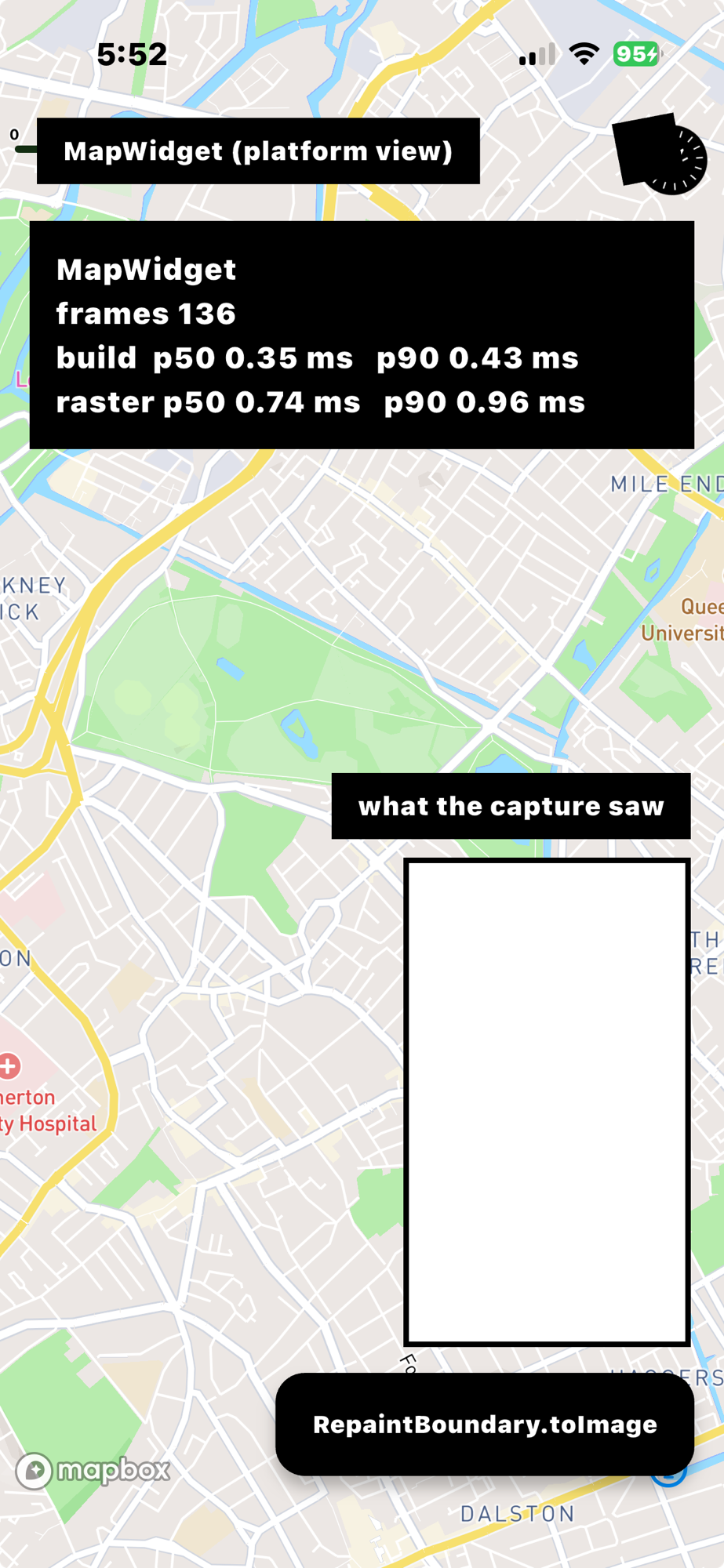
the panel on the right is the capture. the map behind it is rendering perfectly, and the capture of it is white.
what we did about it
we have this working in a fork: the map is created without a platform view, hosted offscreen, and its frames are handed to FlutterTextureRegistry, so the widget tree gets a Texture and nothing else. annotations, the full MapboxMap api, pan, pinch, rotate, pitch, resize and the logo and attribution all work, and captures contain the map.
happy to open the pr. it is about 700 lines, three new files plus 20 lines touched in existing ones, and nothing changes for anyone using MapWidget.
before asking you to review that, two questions:
- is an ios texture path something you would take in principle, or is uikit composition a deliberate constraint?
- if you would take it, do you want it as a separate widget or as an option on
MapWidget?
what happens
on ios the map is a
UiKitView. uikit composites it, not flutter, so the map is not in flutter's scene. anything that needs to read the map back therefore reads nothing:RepaintBoundary.toImageandtoImageSyncreturn a hole where the map is. screenshot a page with a map on it and you get everything except the map.ImageFilter.shaderused as a backdrop samples an empty texture, so a shader driven surface over the map renders as whatever it does with no input. in our case that was solid black.plain
BackdropFilteris fine, the engine special cases it, so this is not "you cannot blur the map". it is narrower and harder: you cannot get the map's pixels into flutter.android does not have this problem.
MapWidgetthere can render into aTextureView, which puts the map inside the flutter scene where everything can see it. there is no equivalent on ios.why it is not just a flag we forgot to port
android's
textureViewswitches the render surface inside a platform view that already composites in the flutter scene. on ios platform views are always uikit composited (flutter/flutter#43902), so the fix is not a flag, it is giving the map a real texture path.how to reproduce
MapWidgetin a pageRepaintBoundarytoImageon it and draw the resultthe map area comes back blank. everything drawn by flutter comes back fine.
the panel on the right is the capture. the map behind it is rendering perfectly, and the capture of it is white.
what we did about it
we have this working in a fork: the map is created without a platform view, hosted offscreen, and its frames are handed to
FlutterTextureRegistry, so the widget tree gets aTextureand nothing else. annotations, the fullMapboxMapapi, pan, pinch, rotate, pitch, resize and the logo and attribution all work, and captures contain the map.happy to open the pr. it is about 700 lines, three new files plus 20 lines touched in existing ones, and nothing changes for anyone using
MapWidget.before asking you to review that, two questions:
MapWidget?