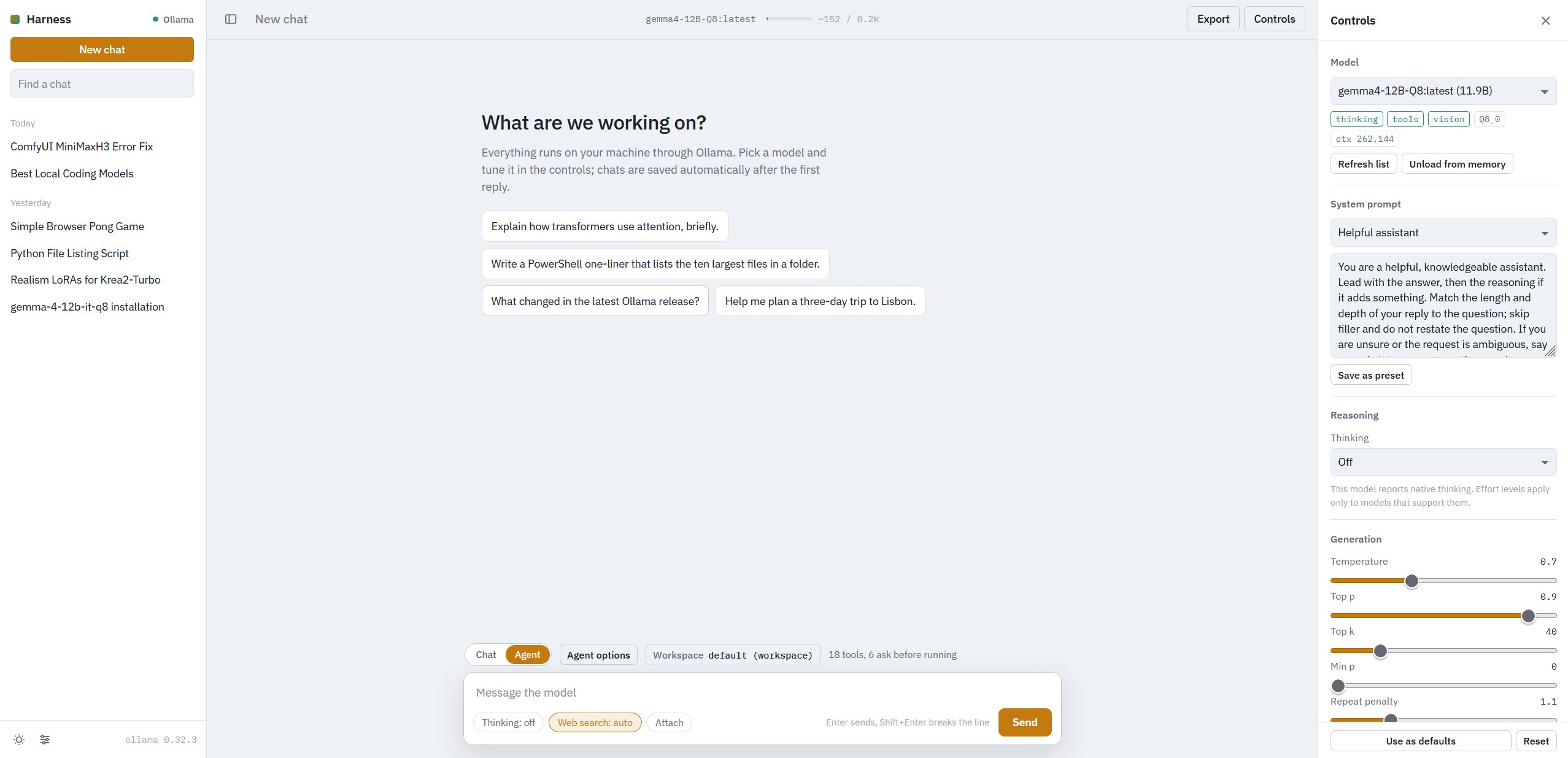
A local chat harness for Ollama models: pick a model, shape it with a system prompt, turn thinking on or off, keep it from looping, and save every conversation. Optional web search grounds answers in fresh results, and an agent mode lets tool-capable models search the web, work on files in a workspace folder and run code, with an Allow / Deny gate in the chat for anything that touches the disk.
Double-click start.bat, or from a PowerShell prompt:
.\run.ps1The script creates .venv on first use, installs the dependencies, starts the server on
http://127.0.0.1:8766 and opens the browser. If Ollama is not already running, the
script starts ollama serve as a separate detached process, so Ollama keeps running after
the app is closed. On other platforms, or with an existing environment, python server.py
starts the server alone.
Environment variables (all optional):
| Variable | Default | Purpose |
|---|---|---|
OLLAMA_HOST |
http://127.0.0.1:11434 |
Where Ollama listens |
LLMHARNESS_PORT |
8766 |
Port of the web UI |
LLMHARNESS_CHATS |
chats/ |
Folder for saved chats |
LLMHARNESS_SETTINGS |
settings.json |
Server-wide settings file |
LLMHARNESS_WORKSPACE |
workspace/ |
Default agent workspace (the setting in the UI wins) |
LLMHARNESS_NOTES |
memory.md |
Notes file written by the agent's remember tool |
- Model selection from whatever Ollama has pulled, with capability badges (thinking, tools, vision) and the model's context length. Unload a model from memory with one click.
- System prompt per chat. Three built-in presets ship with the app ("Helpful assistant", "Agent",
"Agent, complex tasks"). They are served read-only, so they can be updated with the app; your
own presets are stored server-side in
settings.jsonand offered next to them. - Chat / Agent mode switch above the composer: in Chat mode the model only writes replies, in Agent mode it may call tools (see below).
- Thinking mode: model default, off, on, or an effort level for models that support it.
Models that emit
<think>tags without native support are parsed too. Thinking streams live into a collapsible block and shows how long the model thought. - Loop guard: the reply is stopped when a sentence or paragraph repeats N times or the tail of the text is a short fragment repeated over and over. It watches the thinking stream as well as the answer. A thinking budget (tokens) and a per-reply time limit are available too.
- Generation controls: temperature, top p, top k, min p, repeat penalty and window,
max tokens, context length, seed. Blank fields fall back to the model's defaults.
"Use as defaults" stores the whole panel (model, prompt, thinking, search, loop guard)
server-side in
settings.json, so new chats start with it in any browser. - Saved chats as JSON files in
chats/. Chats are saved automatically after the first reply and get an auto-generated title. Rename, pin, delete, filter, and export as Markdown or JSON (the Markdown export includes the tool calls of agent replies). Edit a message and resend, regenerate, or delete messages. - Web search: off, "let the model decide", or "search every message". The model
proposes a query, results come from DuckDuckGo (no API key) or a SearXNG instance, the
pages are fetched and summarised into context, and citations like [1] link to the source.
Messages that explicitly ask for a search ("search the web", "look it up online", "google")
always trigger one in auto mode. A small helper model can be assigned in server settings to
do the planning and titling instead of the (possibly slow) chat model. In Agent mode with the
web_searchtool enabled, "let the model decide" hands the decision to the model itself and skips the separate planning step; "search every message" still runs it. - Live readout while generating: phase (planning, searching, thinking, writing, tools), token count, tokens per second, and elapsed time. Stop at any time; partial replies are kept.
- Context meter next to the model name in the top bar: a small bar with "used / limit" tokens. After a reply
it uses the prompt size Ollama reports; text typed or attached since then is estimated (marked
with
~). It turns orange above 80 % and red when the next prompt would exceed the context length. - File attachments: drop, paste, or pick files in the composer. Text, code, CSV, JSON, Markdown, PDF and DOCX are extracted server-side and placed in the prompt within the context budget (the composer shows the token cost and warns when the end will be cut). Images are only offered for models that report vision; other models refuse them with an explanation. Attached text is stored with the chat, so later turns and regenerations still see it.
- LaTeX math rendered with KaTeX:
$...$and\(...\)inline,$$...$$and\[...\]as display formulas. Code blocks are left untouched. - Dark and light themes.
Model capabilities come from Ollama's /api/show, because the model list endpoint
under-reports thinking and tool support for some imported GGUF models.
Switch the composer to Agent and a tool-capable model can call tools in a loop until it has an answer. Models that do not report tool support answer normally and the reply notes that tools were skipped. The tools, grouped the way the UI groups them:
| Group | Tools | Default rule |
|---|---|---|
| No side effects | get_datetime, calculate, web_search, fetch_page (incl. PDFs), read_attachment |
run on their own |
| No side effects | recall_chats (search earlier chats), ask_user (asks you a question in the chat) |
ask first (ask_user always does) |
| Reads the workspace | list_files, search_files, read_file |
ask first |
| Changes files or notes | remember, open_path, write_file, edit_file, move_file, delete_file |
ask first |
| Runs code | run_python, run_shell |
ask first |
- Approval gate: a tool that asks first shows an Allow / Deny card in the chat and the reply waits for the click, so nothing touches the disk without your say. Every call carries an intent line written by the model ("Read config.json to find the port number"), and each reply keeps a collapsible list of the calls made with their arguments and results.
- Agent options next to the mode switch picks the tools and the step limit (default 8, at most 25 model turns per reply; the last turn is forced to be a final answer). All tools are on by default; untick some only to give a small model fewer options.
- Workspace: file tools,
run_pythonandrun_shellwork inside a workspace folder. The Workspace button next to Agent options lets each chat pick its own folder with a picker (default workspace, home, drives, and the eight most recently used folders); otherwise the default from server settings applies (workspace/next toserver.py). A server setting can lift the restriction so file tools accept absolute paths anywhere on the machine; the approval gate stays in place either way. - Code execution:
run_pythonruns a script with a 30 s limit,run_shellruns PowerShell on Windows andshelsewhere with a 60 s default timeout (up to 300 s). Both use the workspace as working directory and return exit code, stdout and stderr. - Notes across chats:
rememberappends one-line notes tomemory.md; the file is shown to the model at the start of every agent reply that has the tool enabled. - Tool policies: the Tool approval tab in server settings switches each tool between "Asks first" and "Runs on its own", shared by every chat. Switching a file-writing or code-running tool to run unattended asks for an extra confirmation.
The Server settings window (sliders icon at the bottom of the sidebar) is stored in settings.json and shared by every chat.
It has four tabs:
- Models: how long Ollama keeps a model loaded, and an optional helper model for search planning and chat titles.
- Web search: provider (DuckDuckGo or SearXNG), SearXNG URL, region, and a test button.
- Agent workspace: the default workspace folder and the switch that allows absolute paths outside it.
- Tool approval: the per-tool "Asks first" / "Runs on its own" rules.
You are a highly precise and knowledgeable assistant. Your primary goal is factual accuracy. Answer questions directly and concisely.
If you are unsure about a fact or if a query is ambiguous, state your uncertainty clearly rather than guessing and consider doing a web search first if allowed.
Use Markdown (headers, bolding, lists, and code blocks) to organize complex information for maximum readability.
start.bat          Double-click launcher (calls run.ps1)
run.ps1            Creates .venv, installs deps, starts Ollama if needed, starts the server
server.py          FastAPI backend: Ollama proxy, streaming, loop guard, search, agent tools, chat storage
static/index.html  Single-page UI
static/style.css
static/app.js
chats/             Saved conversations (one JSON file each)
workspace/         Default folder for the agent's file tools and scripts
memory.md          Notes saved by the agent's remember tool
settings.json      Server-wide settings: search provider, presets, keep-alive, workspace, tool policies, new-chat defaults
chats/, workspace/, memory.md and settings.json are created on first use and ignored by git.
| Method | Path | Purpose |
|---|---|---|
| GET | /api/health |
Ollama reachability and version |
| GET | /api/models |
Installed models with capabilities |
| GET | /api/models/running |
Models currently loaded in memory |
| POST | /api/models/unload |
Unload a model from memory |
| GET/POST/PUT/DELETE | /api/chats[/{id}] |
Chat storage |
| GET/PUT | /api/settings |
Server settings, prompt presets (incl. built-in), new-chat defaults |
| GET | /api/tools |
Agent tools with their effective approval rules and the default workspace |
| GET | /api/fs/dirs?path= |
Folder listing for the workspace picker |
| POST | /api/generate |
Server-sent-event stream of a reply |
| POST | /api/generate/{gen_id}/stop |
Cancel a running reply |
| POST | /api/generate/{gen_id}/tools/{call_id} |
Allow / Deny (or answer) a waiting tool call |
| POST | /api/extract |
Extract text from uploaded files |
| POST | /api/search |
Run a web search directly |