A Python single-file "coding agent-harness" for any OpenAI-compatible endpoint — built for servers like llama.cpp, vLLM and so on.
Everything lives in py-ai.py: two UIs, two tool-calling protocols, two
transports, a recovery layer, a deterministic security boundary, skills,
memories, sessions, context compression, and file attachments.
Note: As any powerful tool, use at your own risk, may contain non-human code. Recommended usage: local-network or private self-hosted VPN network "Headscale alike" (as we provide no auth/access control).
Python3 deps (=> uv or pip): httpx rich textual (textual is the default UI), exemple:
python3 py-ai.py # talks to http://127.0.0.1:8080/v1
python3 py-ai.py --base-url http://192.168.1.39:8080/v1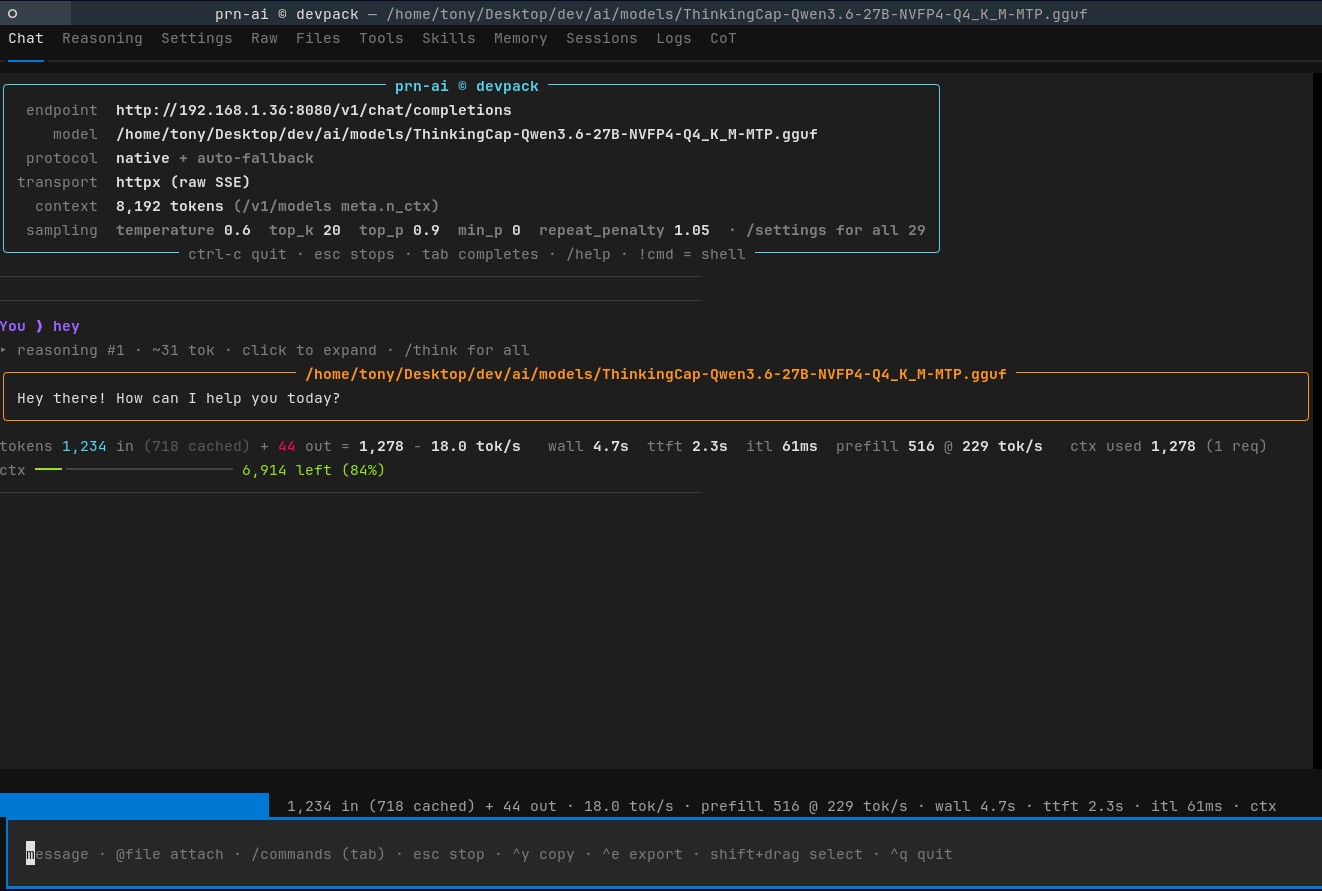
- Quick start
- The interface
- Tools
- Security model
- Approval & risk
- Skills
- Memories
- Sessions
- Context management
- Switching models
- Seeing and undoing file changes
- Planning
- Vendor request fields
- Objective verification and retry
- Answer verification
- Undo / redo
- File attachments
- Custom tools
- Serving to a browser
- Command reference
- Flag reference
- Reliability features
- Tests
# a local llama.cpp server (the default)
python3 py-ai.py

# a remote endpoint, explicit model, cautious approval
python3 py-ai.py --base-url http://192.168.1.39:8080+/v1 --model my-model-27b \
                 --approval low

# a hosted API
OPENAI_BASE_URL=https://api.openai.com/v1 OPENAI_API_KEY=sk-... \
  python3 py-ai.py --model gpt-4o-mini

# plain-terminal UI instead of the full TUI
python3 py-ai.py --ui rich

# read-only assistant: no tools at all
python3 py-ai.py --no-tools
On startup the agent probes the server: available models (/v1/models), the
allocated context window and the default sampler settings (llama.cpp
/props). Everything it discovered is shown in the banner and in
/config. If probing fails it degrades quietly — nothing is required.
--ui textual (default) — a full-screen app with tabs:
| Tab | What it does |
|---|---|
| Chat | The conversation. Reasoning blocks are collapsed one-liners; click one to expand it. |
| Reasoning | Every reasoning block of the session, as collapsibles. |
| Settings | Two tables: the agent's effective launch flags, and the server's sampler settings — both with descriptions. Scrolls. |
| Raw | Every HTTP exchange: request JSON, SSE chunks, assembled response. Wraps to the pane width. |
| Files | A directory tree; selecting a file attaches it to the prompt as @path. |
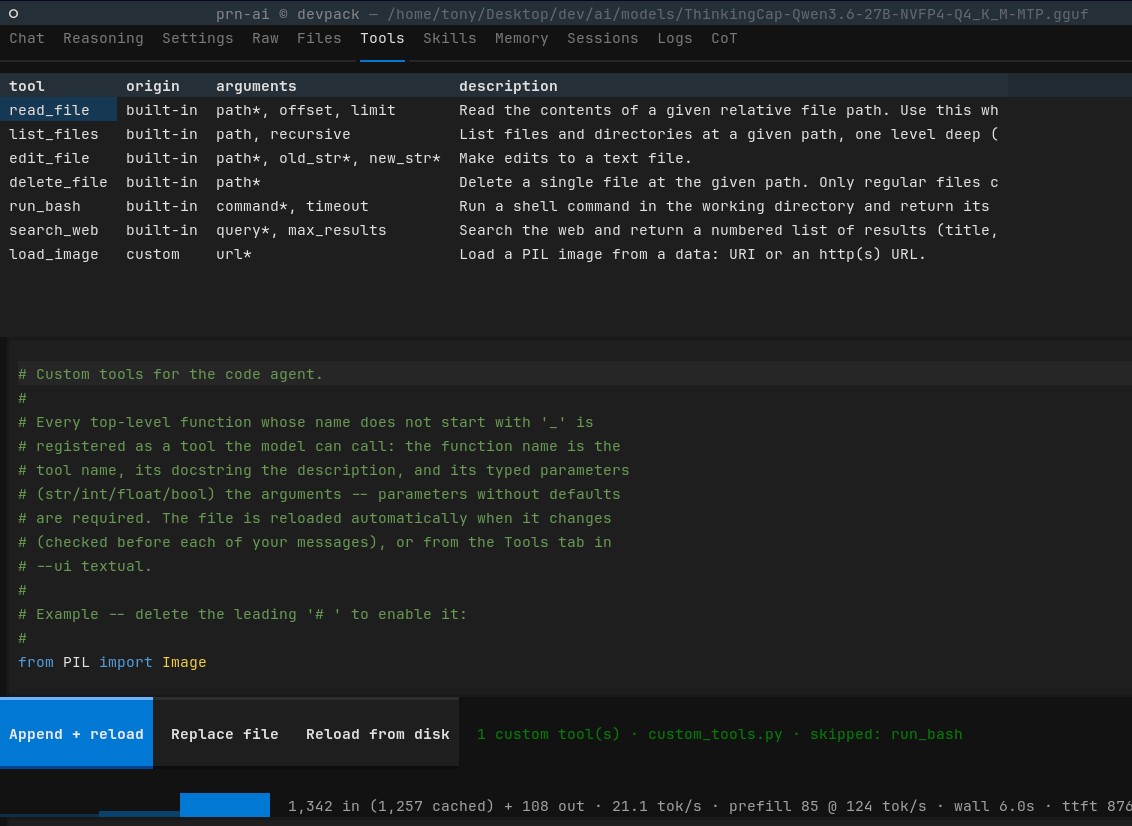
| Tools | Your custom_tools.py: view, append, hot-reload. |
| Skills | Import/activate instruction documents. |
| Memory | Distill, import, load and unload memories. |
| Sessions | Save / load / delete saved sessions. |
| Logs | Live logging output, colour-coded by level. --log-full adds every request body and SSE chunk. |
| CoT | Reserved for chain-of-thought tooling. |
Header shows the model plus badges for the active skill and loaded memories.
The footer shows live token/throughput stats. Keys: esc interrupt,
^y copy last answer, ^e export, ^q quit, tab completion.
--ui rich — the same agent as a scrolling terminal REPL (no tabs; the
same slash commands, with readline history and completion). Useful over SSH,
in CI, or when piping.
tokens 1,234 in (1,100 cached) + 77 out = 1,311 - 27.2 tok/s
wall 8.1s  ttft 5.3s  itl 39ms  prefill 1,200 @ 600 tok/s
ctx used 1,311 (3 req)   ctx ━━━━╸━━━━━━━ 15,073 left (92%)
cached and prefill come from llama.cpp's timings extension: prefill is
prompt-ingestion speed (a slow ttft is usually slow prefill, not a slow
model), and a high cached means the prefix cache is doing its job.
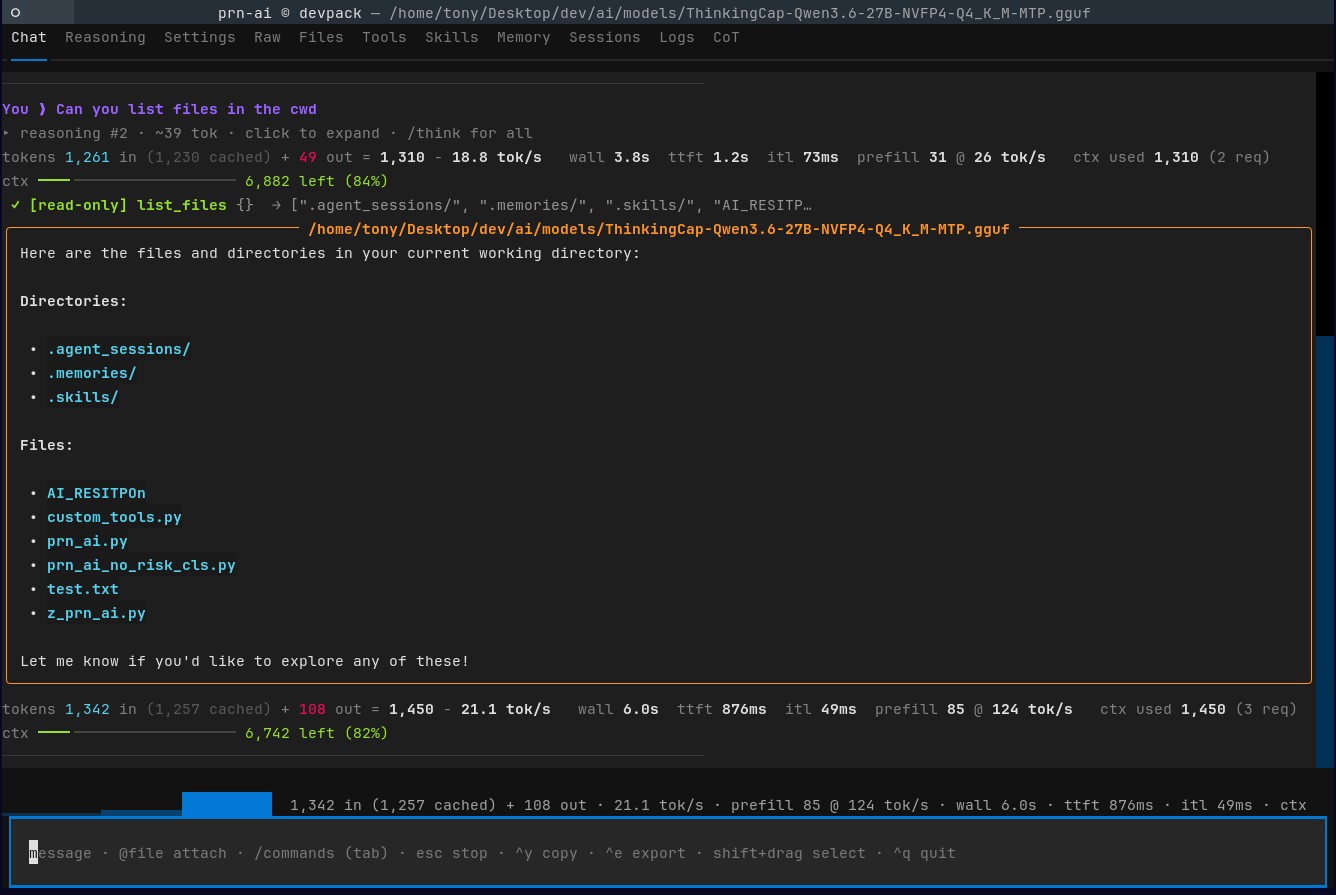
Six built-ins, always available (unless --no-tools):
| Tool | Notes |
|---|---|
read_file |
Paged (offset/limit), capped by the read budget. Clean errors for directories, missing and binary files. |
list_files |
Shallow by default, recursive opt-in. |
edit_file |
Substring replace on an existing file. |
write_file |
Write or append a whole file, creating parent directories. The clear way to create a file; overwriting is shown as a diff before approval. |
delete_file |
One regular file at a time — never a directory. |
search_files |
Regex search across files, returning path:line: text. The way to FIND things instead of reading whole files. The traversal streams and is bounded (5 000 directories, 5 000 files, depth 12, 10s); a partial answer says so instead of looking conclusive. Read-only, never gated. |
run_bash |
Combined stdout+stderr prefixed [exit N], 20K output cap. A command still running after 30s is handed off as a background job rather than killed; background=true detaches immediately. See /jobs. |
wait_background |
Wait for a background job and return its output exactly as a foreground run would. Waits indefinitely by default; only polls, so it can never kill the job. Read-only, never gated. |
search_web |
Keyless DuckDuckGo HTML search; numbered title/URL/snippet. Transient failures are retried in the harness, and a bot-check page is reported as blocked rather than as "no results". Read-only, never gated. |
Tool errors are written for the model: '.' is a directory, not a file. Use list_files… rather than a raw IsADirectoryError. That difference is
what stops small models looping on a doomed call.
The threat model is: assume prompt injection will be attempted, and assume the model may be fully compromised. Defenses therefore live in deterministic Python at the tool-execution boundary — not in the prompt.
PolicyEngine.check() runs before the risk rating, before approval,
and before /yolo is consulted, so nothing can bypass it:
- Path confinement — file tools resolve with
realpathand must land inside the working directory. Blocks../escapes, absolute paths,~/.ssh, and symlinks pointing out. (--no-path-confinementopts out.) - Command denylist — categorically refuses destructive/exfil patterns
(
rm -rfin any spelling,dd,mkfs, fork bombs,curl|sh, reverse shells, reading/etc/shadowor.env, bareenv/printenvdumps,crontab, recursivechmod). Matched against a whitespace-normalised copy sorm -frcan't slip through. (--no-command-denylistopts out.) - Argument size cap — 100K chars per argument; oversized payloads are a DoS/exfil signal, never a normal call.
- Result fencing — tool output is scanned for injection markers and wrapped as untrusted DATA. This one is advisory: a compromised model can ignore a fence, so its real value is the warning in the Logs tab.
Blocks are logged and returned to the model as a hard limit, so it changes course instead of retrying. Reducing defenses prints a startup warning.
Custom tools you write run arbitrary Python and are not covered by the denylist — the built-in
run_bashis the policy-checked one.
Every non-read-only tool call is risk-rated, then gated against your
threshold. --approval sets the highest level that is auto-approved:
--approval |
Behaviour |
|---|---|
all |
Prompt for everything |
low (default) |
Auto-allow reads; prompt for edits/commands |
medium |
Auto-allow project edits and ordinary commands; prompt for high risk |
high |
Auto-allow everything, still logged |
yolo |
Never prompt, skip rating entirely |
Rating is done by --risk-classifier heuristic (default): instant pattern
rules, zero tokens, so the prompt appears immediately. model asks the LLM
instead — capped at 96 tokens with a 15s timeout, and only sensible with a
fast non-thinking model.
Feedback is explicit on every call: [read-only] (never gated),
↳ auto-allow [low] … with the reason, [risk: HIGH — …] [Y/n] when it
exceeds the threshold, or ⊘ denied. Live control: /approval, /yolo.
Skills follow the Agent Skills specification:
a skill is a directory containing SKILL.md with YAML frontmatter
(name and description required) followed by markdown instructions.
skills-dir/
└── pdf-processing/
    ├── SKILL.md          # ---\nname: pdf-processing\ndescription: ...\n---
    ├── scripts/          # optional, listed but never auto-read
    ├── references/
    └── assets/
/skills                 list them with descriptions (* = active)
/skill 2                activate by number
/skill pdf-processing   activate by name
/skill off              deactivate
Discovery scans the project scope then the user scope, so project skills shadow user ones (with a warning), covering the cross-client cross-client convention as well as our own:
| Scope | Paths |
|---|---|
| Project | --skills-dir (default .skills/), .agents/skills/ |
| User | ~/.agents/skills/ |
| Extra | anything added with --skills-search DIR (repeatable) |
Progressive disclosure is respected: only the active skill's body is
loaded into context, frontmatter stripped, with bundled scripts/,
references/ and assets/ files listed rather than read — the model
loads one on demand via read_file if the instructions call for it.
Because the skill is injected per request rather than added to the
conversation, /compact can never prune it away.
Validation is lenient, as the spec's client guide prescribes: a name
that breaks the rules (uppercase, underscores, consecutive hyphens, over 64
chars) or disagrees with its directory loads anyway with a warning in
/skills; only a missing description skips a skill, since disclosure
depends on it. Importing from the Skills tab writes a compliant
directory — frontmatter you supply is kept, anything missing is synthesised
and validated. Pre-spec flat .md files still load, marked [legacy].
--skill NAME activates one at startup; the active skill shows in the
header and is restored with a session.
Skills are the practical fix for a small model's bad habits, e.g. "To delete a file use delete_file; never claim an action you did not perform via a tool call."
Memories are distilled session knowledge. Unlike skills, several can be loaded at once, and they're injected together as a system block.
/memory save                     distil this session into a note
/memory save focus on config     ...with focus guidance
/memory remember redis socket    keyword search, ranked, with snippets
/memory list                     name · date · title (* = loaded)
/memory load 2                   load one (repeat to load several)
/memory off [name]               unload one or all
save asks the model to act as a memory-keeper over the session transcript:
what problem was solved, what worked, specific paths/commands/config, and
why things work. It's saved to .memories/ with a name derived from the
model's own # Title.
Every turn autosaves to .agent_sessions/ (--no-autosave disables). A
session stores the transcript, reasoning blocks, trimmed raw exchanges, and
the active skill.
/save          /sessions          /load 3 | /load last | /load <id>
/export        markdown transcript
/export html   a styled, self-contained web page
/export html writes a single file with no external assets: the transcript,
collapsible reasoning blocks, collapsible raw exchanges, and any images you
attached embedded as data URLs. Everything is HTML-escaped — a transcript
can contain arbitrary model output and you open this in a browser.
--resume last restores at startup. Loading replays the transcript,
reasoning (interleaved by turn) and raw exchanges into the UI, and
reactivates the skill it was recorded with. Saved requests drop their
message bodies — repeating the whole history in every exchange would make
files grow O(N²).
/compact                   summarise older turns, keep the last 2 verbatim
/autocompress 85           auto-compress when the context is 85% full
/autocompress off
/max-tokens 12000          per-response output ceiling
/read-limit 40000          chars inlined per read_file / @attachment
Compression asks the model for a dense summary and splices it in as a single turn. It is bounded (2048 tokens), template-safe (never leaves a tail starting on an orphaned tool result, which llama.cpp's Jinja rejects), and refuses to splice a summary that isn't smaller than what it replaces. Auto-compression is more conservative than manual: it keeps roughly the last third of the conversation.
If a response is cut off you get told: ⚠ response hit the max_tokens ceiling (4096) and was cut off. Raise it with /max-tokens <n> — the common
failure with reasoning models that think at length.
/model                 list what the endpoint serves (* = current)
/model 2               switch by number
/model my-model-27b    switch by name
Useful when a small model handles the routine turns and a larger one is worth loading for the hard step — the conversation carries over, so you can hand the same context to a better model and continue.
Everything derived from the model follows the switch: the context window is
re-probed (so the headroom bar is right), the sampler defaults are
re-read, the header and Settings tab update, and — under --protocol auto
— a prior fallback to the text protocol is reset to native, since that
failure may have belonged to the previous model. An explicit
--protocol text is left alone.
Names the endpoint does not list are still accepted (aliases, private deployments). Loading a session recorded with a different model tells you so rather than switching behind your back.
The server's prefix cache starts cold after a switch, so expect one slower turn.
--engine auto (the default) probes the endpoint once at startup:
/props answering means llama.cpp, max_model_len on a /v1/models
entry means vLLM, anything else is treated as a generic
OpenAI-compatible server.
What it changes: llama.cpp's DRY sampler family is only sent to llama.cpp. On vLLM or a hosted API those fields are dropped up front (with a notice) and repetition recovery escalates the temperature instead — otherwise the retry would use identical sampling and the loop would simply repeat. A field an endpoint rejects is still dropped and retried automatically, so this only saves the wasted round trip; nothing depends on getting the detection right.
Context-window discovery already covers both: max_model_len from
/v1/models (vLLM) or n_ctx from /props (llama.cpp). That matters more
than it looks — the context bar and auto-compression both need a window
size, and auto-compression silently disables itself without one.
What vLLM does not provide: sampler defaults and the chat template (no
/props), so /settings and /capabilities are correspondingly emptier
and say so, and per-request timings (so prefill and cached are
absent).
run_bash is not the only tool that can take a long time, but the right
treatment differs per tool.
search_files gets bounds, not a handoff. The traversal used to
collect every candidate before scanning any, with no ceiling — on a
monorepo, an unignored dependency tree or a network mount that is a
multi-minute, uninterruptible stall inside a tool the model calls freely.
It now streams (via os.scandir, stopping as soon as it has enough) and
is capped at 5 000 directories, 5 000 files, depth 12 and 10 seconds.
Crucially, a truncated search says so: these results are PARTIAL, narrow the pattern — a partial answer the model trusts is worse than a
slow one. Symlinked directories are not followed, so a loop cannot hang it.
search_web gets retries and real failures, not a handoff. A search
has no partial value — there is no half-finished work to preserve, so
detaching it would cost a pid, a log and a second tool call to save at most
a few seconds. What it did need:
- Retries in the harness (3 attempts, backing off) — a DNS blip or a 502 is our problem, exactly as it is for a model request.
- Failure classification. Rate-limited (HTTP 429), endpoint down, and
blocked are now distinct, each telling the model what to do. The
important one: a bot-check page answers 200 with no results, which
used to be reported as
No results— telling the model the web has nothing on the topic. It now says the query was not actually searched. - A
timeoutparameter, and debug logging of query, status, elapsed time and result count.
Every command is launched detached and then polled, so a slow command is
never lost: if it outlives its window it is handed off as a background job
instead of being killed 30 seconds into a docker pull.
run_bash(command="cargo build --release")
  → [background] pid 4821 · still running after 30s
    output is being appended to .agent_logs/…-cargo-build.log
    wait for it with wait_background(pid=4821), or read the log

wait_background(pid=4821)
  → [exit 0]
    Finished release [optimized] target(s) in 3m 12s
Anything that finishes inside the window returns exactly as before —
[exit 0]\nhello — and leaves no log behind. timeout=N widens the
window, timeout=0 waits indefinitely, background=true detaches straight
away (dev servers, watchers), and a command containing sleep N gets its
window extended to N+10 automatically, so the tempting sleep 30 && …
pattern behaves as a model expects.
The command is detached with nohup in its own session, output goes to a
per-job log under .agent_logs/, and the tool returns immediately telling
the model to read_file that log to check progress. /jobs lists every
job with its live state:
pid    state      started   command        log
4821   running    15:06:03  npm run dev    .agent_logs/…-npm-run-dev.log
4830   exit 0     15:07:11  make build     .agent_logs/…-make-build.log
State is resolved with a non-blocking waitpid, which also reaps the
child — a probe alone would report a finished job as running forever,
because a zombie still answers kill(pid, 0). Each log ends with an
[exit: N] trailer, so a model that read_files it sees how the command
ended without needing /jobs; the wrapper re-raises the real status, so
the trailer and /jobs always agree. Logs are pruned to the newest 50 and
7 days, never removing one belonging to a running job.
The job is detached with setsid (start_new_session=True), not just
nohup: nohup ignores only SIGHUP, so a plain-nohup job stays in the
agent's process group and a terminal Ctrl+C would kill it mid-run.
Backgrounding never rates low risk, whatever the command: nothing supervises a detached process, so it is never auto-approved at the lowest tier.
While any job is outstanding, a system-level block is added listing the live jobs and the rules for them. It costs nothing on a normal turn — there is no block when nothing is running — and it targets the mistake that is specifically expensive:
No output is not death. Docker layer extraction, compilation, CUDA graph capture and large clones are legitimately silent for minutes.
So the model is told to sample twice a few seconds apart (ps CPU,
/proc/<pid>/io byte counters, du -sh growth) before calling anything
stuck, that process state D is uninterruptible I/O and therefore
working, and never to pkill for a "clean restart" — which throws away
work that may be nearly complete. It also reads exit codes properly: 130
is something interrupted this, 137 is usually the OOM killer, and
context canceled is a signal of a signal — none of them mean "the
command failed, retry it".
Mutating tools are approved from an argument dump, which is no way to judge an edit. Two things fix that.
The approval prompt shows a real diff. Before you answer [Y/n] for an
edit_file or delete_file, the exact change is rendered — simulated with
the same replacement semantics the tool uses, so what you see is what will
happen:
╭─ proposed change · main.py ─╮
│ --- a/main.py               │
│ +++ b/main.py               │
│ @@ -1,2 +1,2 @@             │
│  def add(a, b):             │
│ -    return a - b           │
│ +    return a + b           │
╰─────────────────────────────╯
allow edit_file({"path": "main.py", ...})?  [risk: MEDIUM — ...]  [Y/n]
Changes are recorded and reversible.
/diff              every file tools changed this session, as unified diffs
/diff main.py      one file
/revert            restore all changed files to their session-start contents
/revert main.py    restore one
The first time a tool touches a file, its contents are snapshotted. A file
the agent created reverts by being deleted; a file it deleted is restored.
Files too large (>1 MB) or non-text are not snapshotted, and /diff
says so rather than pretending they are tracked.
Shell commands are tracked too. What run_bash touched cannot be read
from its arguments, so a cheap stat-only manifest of the workspace is taken
before and after every shell call and the two are compared:
- files it created are fully handled —
echo x > test.txtshows up in/diffas a new file and/revertdeletes it - files it modified or deleted are reported (
pre.txt: modified by a shell command) but marked unrevertable, because their previous contents were never snapshotted. If a tool had already touched the file, the baseline exists and it reverts normally.
Every shell call that changes anything says so immediately:
shell touched 1 created, 1 modified: test.txt, pre.txt · /diff.
/undostill rewinds only the conversation — a chat command should not silently rewrite your disk. But it tells you how many files differ and points at/diffand/revert, so the escape hatch actually exists. For guaranteed rollback of arbitrary shell effects, use git.
For anything with several steps, a plan keeps a small model on track — and gives you a checkpoint you can edit.
/plan                             show the checklist and progress
/plan code_security               plan that task (one bounded model call)
/plan review the auth middleware  ...a fuller description gives better steps
/plan new <task>                  explicit form (use when the task starts
                                  with add/done/drop/clear/auto)
/plan add <step>                  append a step yourself (free, no tokens)
/plan done 2   /plan undone 2     tick steps off by hand
/plan drop 3   /plan clear        edit or discard
/plan auto [off]                  toggle automatic planning
python3 py-ai.py --plan auto                      # plan when a request needs it
python3 py-ai.py --plan "audit for security bugs" # plan this task at startup
--plan takes either a mode (off, auto) or a task: anything else
is planned before your first message. /plan <task> does the same mid-session
— the only catch is that add, done, undone, drop, clear and auto
are subcommands, so a task beginning with one of those words needs
/plan new <task>.
The plan lives outside the conversation and is injected at the system
level every turn, so it survives /compact, long tool sequences and
context pressure — which is exactly when a small model loses the thread.
Each turn the model is told which step to work on and not to skip ahead:
## Current plan
1. [x] read main.py
2. [ ] add the --flag option
3. [ ] run the tests

Work on step 2 (add the --flag option) and only that step...
Progress costs no extra request. The model ends a reply with
PLAN: done 2; that marker is parsed deterministically, the step is ticked,
and the marker is stripped from the stored transcript. If the model forgets,
/plan done 2 does it for free.
Auto mode is decided deterministically — no tokens spent deciding whether to spend tokens. A request qualifies when it chains actions ("and then", "after that"), names three or more distinct actions, uses a whole-task verb (refactor / migrate / implement / port / scaffold), or contains an enumerated list. Short questions never trigger it, and an existing plan is never silently replaced.
The plan is session state: saved and restored with the session, rewound by
/undo, cleared by /restart, and shown in the header as plan: 1/3.
Local servers accept fields the OpenAI schema does not, and reasoning models are usually switched with one of them.
python3 py-ai.py --no-thinking
python3 py-ai.py --extra-body '{"chat_template_kwargs":
                                {"enable_thinking": false}, "top_k": 20}'
/thinking off | on the boolean switch
/thinking high a level -- or low, medium, xhigh, ...
/thinking 4096 a numeric budget
/thinking key reasoning_effort where a level is written
/thinking default leave it to the server
/capabilities what this endpoint actually accepts
/extra-body {"top_k": 20} merge fields into every request
/extra-body show /extra-body off clear
There is no standard for reasoning control, so this passes your value through verbatim rather than validating it against a hardcoded list:
| You type | Sent |
|---|---|
/thinking off |
chat_template_kwargs.enable_thinking = false |
/thinking high |
enable_thinking = true and chat_template_kwargs.reasoning_effort = "high" |
/thinking 4096 |
the same, with a numeric 4096 (token budgets) |
--thinking-key reasoning_effort |
writes the level top-level instead, OpenAI-style |
A level implies thinking is on, so both fields go out together — a template
that only understands the boolean still does the right thing, and a server
that rejects the other field simply has it dropped. xhigh, minimal or
any vendor word works, because nothing here second-guesses your server's
vocabulary.
/capabilities (or /caps)
Mostly there is nothing to query — /v1/models returns ids and no
OpenAI-compatible endpoint publishes its accepted request fields. But
llama.cpp exposes its chat template at /props, and the template is
the ground truth: the chat_template_kwargs it accepts are exactly the
variables the Jinja source reads, and the values it understands are the
literals it compares them against. /capabilities scans it:
chat_template_kwargs    values it compares against
enable_thinking         false
reasoning_effort        high, low
That is discovery rather than guesswork. It also reports the served models,
the context window and how many sampler defaults were found. When the
endpoint exposes no template, it says so plainly instead of inventing a
list — set fields with /extra-body and rely on rejected ones being
dropped.
Fields are merged one level deep, so --no-thinking and an
--extra-body that also sets chat_template_kwargs combine rather than
overwrite each other. They are sent top-level over httpx and via
extra_body= with --transport sdk.
They apply to every request, including the internal risk-classifier,
critique and planner calls — which is where enable_thinking: false pays
off most, since those run on a small token cap that a thinking model
otherwise spends entirely on reasoning.
If the endpoint rejects a field, the 400-blame logic drops just that field and retries instead of failing the turn, so an unsupported vendor extension degrades quietly.
One command, a JSON verdict, a meaningful exit code:
python3 py-ai.py --task "fix the failing parser tests" \
                 --verify-command "pytest -q" \
                 --unattended --sandbox limits --report run.json
echo $?    # 0 green · 1 red or suspect · 2 budget · 3 fatal
--task is the batch front door: it runs the text as the task without
reading stdin, exits when done, forces the plain UI (so a batch run cannot
sit waiting on a TUI), and makes the exit code meaningful. Repeat it for a
sequence — the tasks share one session, so later ones build on earlier
work — or read one from a file with --task-file PATH (- for stdin).
With a verify command configured, a failure doesn't just get described — it gets fixed:
python3 py-ai.py --verify-command "pytest -q" --verify-mode iterateverify command: FAILED (exit 1)
verify: 2 failed check(s) · objective problems found
• new failure: FAILED tests/test_parser.py::test_offset - assert 3 == 4
verify: iterating (round 1 of 4) · tools enabled
✓ read_file {"path": "src/parser.py"}
✓ edit_file {"path": "src/parser.py", ...}
verify command: passing
--verify-mode is auto by default: iterate when a verify command is
set (an objective failure needs a fix, not a better description) and
revise otherwise (the right response to a soft critique). Either can be
forced.
The iteration is a full tool-using turn — read, edit, run — and the failure and the fix both stay in history, because "the tests said X so I changed Y" is part of the work rather than harness scaffolding. The prompt also states plainly that editing the tests or the verify command to silence a failure is not a fix.
python3 py-ai.py --unattended --verify-command "pytest -q" < task.txtTwo things change when nobody is watching.
Gated calls are declined automatically, and visibly. Waiting on a prompt nobody can answer would hang the run; denying silently would stall it with no explanation. Instead the model gets something it can act on:
⊘ unattended: declined [medium] edit_file({"path": "m.py", ...}) (writes a project file)
automatically declined: this call is rated MEDIUM (writes a project file), above the unattended approval level 'low'. Nobody can approve it while running unattended. Either take a lower-risk approach that does not need approval, or report that this step needs an operator.
Read-only tools are unaffected, an allowed risk level still runs, and an
explicit --yolo still wins — the operator accepted that risk deliberately.
Session budgets bound the whole run, not just a turn:
| Flag | Unattended default |
|---|---|
--max-session-requests |
200 |
--max-session-seconds |
3600 |
--max-session-tokens |
unlimited |
Explicit flags always override the defaults, and they work with or without
--unattended. They count every request — retries and the internal
classifier, critique and planner calls included — because a budget is about
cost, not visibility. They are checked at turn and iteration boundaries
rather than mid-turn, since stopping halfway through would leave a
half-applied change; the per-turn request ceiling handles a single runaway
turn. When a budget is spent the session says which one, prints the
totals, autosaves and exits.
Given a failing check and permission to edit anything, the cheapest route to green is to weaken the check. So a pass whose own inputs were edited is not reported as a pass:
 ✓ edit_file {"path": "tests/test_math.py", "old_str": "EXPECTED = 3", ...}
   ⚠ this iteration edited tests/test_math.py (inside a test directory)
     -- editing what the check measures is not a fix
verify command: passing
verify: the check passes, but this run edited files the check depends on
        (tests/test_math.py) -- NOT reporting success. Inspect with /diff.
State becomes suspect and the exit code is 1, so it cannot slip through
CI. A fix to the code under test passes normally.
Detection is deterministic and tool-agnostic: workspace manifests are
compared around each iteration, so a sed -i from run_bash is caught
exactly like an edit_file call. A changed file counts as a verify target
when it is named by the command (python3 check.py), sits in a test
directory (tests/, spec/, __tests__/, fixtures/), looks like a test
by name (test_*.py, *_test.go, *.spec.ts) or is configuration that
governs the check (conftest.py, pyproject.toml, Makefile,
jest.config.js). Source files and docs are not targets.
--allow-verify-edits turns the guard off for when editing the tests is
the task; the edits are still recorded in the report, just not treated as
failure.
python3 py-ai.py --unattended --verify-command "pytest -q" \
                 --report run.json --sandbox limits < task.txt
echo $?
--report writes a JSON account of the run — verification state and
iteration count, files changed (including those a shell command touched),
session totals, stop reason, plan progress, background jobs and the final
answer — and makes the process exit code meaningful:
| Code | Meaning |
|---|---|
| 0 | the check passes, or none was configured |
| 1 | the check does not pass, or passed only after its own inputs were edited |
| 2 | stopped by a session budget: inconclusive |
| 3 | could not run |
Two deliberate choices. Exit codes are only non-zero when --report or
--unattended is passed, so an interactive session never hands your shell
a surprise. And a failure that pre-dates the run still exits 1: "exit 0"
has to mean the check passes now, or it cannot gate anything — the report
still distinguishes failing from pre_existing_failures for diagnosis.
At exit, if the command never ran during the session (because no turn changed a file), it is run once over the whole project, so the report answers "is it green now?" rather than "unknown".
python3 py-ai.py --sandbox limits --sandbox-cpu 600 --sandbox-memory 4096Applies CPU-time, address-space, file-size and process limits to every
shell command and to the verify command. This stops the failure that
actually bites an unattended run — a runaway build, a memory hog, an
accidental fork bomb. Tested: a busy loop is killed after its CPU budget
and a 400 MB allocation raises MemoryError under a 256 MB cap.
Implemented with shell ulimit rather than subprocess's preexec_fn,
which the standard library documents as unsafe in threaded programs — and
the Textual UI runs the agent on a thread. Each limit is emitted separately
and tolerates failure, because support varies (dash has no ulimit -u,
macOS ignores -v) and one unsupported option must not disable the rest.
This bounds resources, not reach. A limited command still runs with your permissions in your working directory;
run_bashis filtered by the denylist but is not isolated. It is a guard against runaway cost, not a security boundary — real isolation needs a container.
Progress is measured by comparing failure sets between iterations. No model judgement is involved, so the loop always halts for a stated reason:
| Comparison | Outcome |
|---|---|
| No failures left | fixed — done |
| Fewer or different failures | progress — iterate again |
| Identical failures | stuck — stop, rather than repeat the same attempt |
| New failures, or more of them | regressed — stop, and point at /diff and /revert |
Plus three budgets: --verify-rounds (default 4 in iterate mode, 1 in
revise), the token budget, and a 900-second ceiling on the whole loop. The
per-turn request ceiling still applies on top, with its forced-final answer.
Limits: the loop can only fix what the verify command detects, so code that is wrong in ways the tests don't cover will iterate to green and still be wrong. And nothing here is a security boundary —
run_bashis filtered by the denylist but is not sandboxed, so an unattended run is only as safe as the commands it is allowed to make.
Self-critique is soft; running the project's own checks is not.
python3 py-ai.py --verify-command "pytest -q"/verify-command "make test" set or change it mid-session
/verify-command off disable
/retry redo the last turn from scratch
/retry 0.9 ...and raise the temperature first
After any turn that changed files (and only then — a question never triggers a test run), the command runs.
Include {files} to check only what changed:
python3 py-ai.py --verify-command "ruff check {files}"The startup baseline expands {files} to the whole project, so
pre-existing problems anywhere are recorded and never attributed to a
turn; each turn then checks just its own files, which turns a slow
project-wide check into a fast one. Paths are shell-quoted, files deleted
during the turn are dropped, and a change touching more than 50 files
falls back to the project rather than building an enormous argv. A command
without {files} behaves exactly as before. Failures become concrete issues on
the same path as the deterministic checks, so the existing revise loop, its
round cap and its token budget all apply unchanged:
verify command: FAILED (exit 1)
verify: 2 failed check(s) · objective problems found
   • the project's verify command `pytest -q` failed with exit code 1
   • new failure: FAILED tests/test_parser.py::test_offset - assert N == N
verify: revising...
Pre-existing failures are not blamed on the model. The command runs once at startup to record a baseline (exit code plus a normalised fingerprint of the failure lines); afterwards only new failures — or a changed exit code — count as this turn's fault. A suite that was already red stays the operator's problem, and the agent says so instead of burning its revision budget on it. If the baseline fails with no recognisable failure lines, it warns that regression detection will be weak (usually a missing dependency or a wrong path).
It works with or without --verify: on its own you get objective checking
and no self-critique at all.
/retry re-runs the last turn from scratch — rewinding the conversation
and undoing that turn's file changes, then resending the same message.
That file rewind is what makes it sound: retrying against a half-edited tree
would compound the previous attempt instead of replacing it. It relies on
per-turn baselines, which are separate from the session baselines /revert
uses, so retrying one turn in a long session does not roll everything back.
Because a greedy configuration would just reproduce the same answer,
/retry <temperature> sets the temperature first (announced, and it
persists — no hidden one-shot state).
Optional: after a turn settles, the model scores its own answer and revises it when the score is poor.
python3 py-ai.py --verify                      # on, defaults below
python3 py-ai.py --verify --verify-threshold 85 --verify-rounds 2
/verify show the current state
/verify on | off toggle for this session
/verify 85 set the threshold (and enable)
Asking one model to grade its own work is biased and noisy. Four countermeasures, in order of how much they help:
1. Deterministic checks run first — no model, no tokens, no bias. Some claims are simply verifiable in Python:
- fenced
python/jsonblocks are parsed; a real syntax error is a fact, not an opinion (fragments, elisions like...and diffs are skipped, so correct partial snippets are never "fixed") - claimed actions are matched against the tool calls that actually
happened: an answer saying "I've successfully deleted the file" when
no
delete_fileran is caught outright. This is the failure a self-judge is worst at, because the reviewer reads the false claim as evidence.
When these fire, the concrete problems go straight to the revision and the judge is never consulted.
2. The critique is blind. The answer is presented as "a CANDIDATE (another assistant, not you)" submission to be marked, which measurably reduces self-preference bias compared with "review your answer".
3. The rubric is anchored. Explicit bands (90-100 / 70-89 / 40-69 / 10-39 / 0-9), priority order, a ban on style nitpicking and on asking for information the model could not have, and a consistency requirement: a score below 70 must name an issue. A low score with no stated problem is rejected as an unusable verdict rather than triggering a blind rewrite.
4. Best-of, not last. A revision can be worse than the draft. Every
candidate is scored and the highest-scoring one wins; if the rewrite
regresses you see reverting to the better answer. Optional
--verify-samples 3 takes the median of three critiques and the union of
their issues, which steadies a noisy judge for 3x the critique cost.
Below the threshold you see the score, the concrete issues, and the revised answer streaming in; the kept answer replaces the assistant message, so the session stores the final version, not the draft.
Bounded on three axes, because self-critique otherwise burns a context window arguing with itself:
| Bound | Flag | Default |
|---|---|---|
| Score below which a revision happens | --verify-threshold |
70 |
| Revision/iteration rounds per turn | --verify-rounds |
1 revise / 4 iterate |
| Tokens for critique + revision per turn | --verify-budget |
3000 |
| Critiques averaged per check (median) | --verify-samples |
1 |
The critique call is capped at 400 tokens with a 30s timeout, and — like
the risk classifier and compression — it is invisible: nothing about it
enters /think, /raw, the conversation, the saved session, or the stats
line. An unparseable verdict accepts the answer rather than retrying, so
a confused judge can never spin the agent.
PB: even with all four measures, a weak model is still a weak judge — the deterministic checks are the part you can actually rely on. Verification costs an extra request (or two) per turn, so it stays off by default. Try it on real tasks before leaving it on.
/undo      rewind the last turn
/redo      re-apply it
Each user turn snapshots the conversation, reasoning blocks, raw exchanges
and last answer beforehand, so /undo rewinds all of them together and
re-renders the views. Up to 10 turns deep; starting a new turn abandons the
redo branch (standard editor semantics); /restart clears the history. The
rewound state is autosaved, so the session file matches what you see.
Because a compaction happens inside a turn, /undo also reverses
/compact — the full turns come back.
/undorewinds the conversation, not the world. If the undone turn ranedit_file,delete_fileorrun_bash, those changes remain on disk; the notice says so every time. Use git if you need real rollback.
Prefix a path with @ to attach it to your message:
You ❯ @src/main.py why does this leak?
You ❯ @"design notes.md" @diagram.png does the code match the diagram?
- Text files are inlined as fenced blocks, capped by the read budget.
- Images (
.png .jpg .jpeg .gif .webp .bmp) become properimage_urlcontent parts for multimodal models, capped at 10 MB. - Tab completes paths (
@sub/lists inside a directory). - The Files tab appends
@pathon selection. - Dragging a file into most terminals pastes its path, which is converted to a token automatically (terminal only — the browser delivers no file).
- Attachments obey path confinement, and
bob@example.comis never mistaken for one (only word-start@counts).
Attaching beats asking the model to call read_file: it removes the model's
tool judgment from the loop entirely.
custom_tools.py (created on first run) is hot-reloaded. Any plain function
with annotations becomes a tool — the schema is inferred from the signature
and the docstring becomes the description:
def word_count(text: str, unique: bool = False) -> str:
    """Count the words in a string."""
    words = text.split()
    return str(len(set(words)) if unique else len(words))
Edits are picked up without a restart (a syntax error keeps the previous set
and reports the error). Names that shadow a built-in are skipped, so a
custom read_file can never replace the policy-checked one. Manage it from
the Tools tab or point elsewhere with --tools-file.
pip install textual-serve
python3 py-ai.py --serve --serve-port 8000
Opens the same TUI in a browser via textual-serve. Each connection is its
own subprocess; disk state (.skills/, .memories/, sessions, the working
directory) is shared. The ! shell escape is disabled by default under
--serve — pass --bash-escape to force it on.
Anyone with the URL can drive the agent, including approving tool calls. The
PolicyEnginestill holds, but don't expose arun_bash-equipped agent on an open port without auth in front of it.--no-toolsmakes a safe shareable chat instance.
| Command | Description |
|---|---|
/help |
this list |
!<command> |
run a shell command locally (not sent to the model) |
/think |
expand/collapse ALL reasoning blocks of the last turn |
/res /answer |
re-show the last answer |
/settings /sampling |
server sampler defaults + everything this agent overrides on the wire (and, where the endpoint publishes no defaults, what it sends anyway) |
/system [text|file <p>|default] |
override the system prompt |
/config /flags |
all 41 effective settings, read from live state |
/raw |
all HTTP exchanges of the last turn (numbered) |
/raw chunks |
the raw SSE events per exchange |
/save [title] |
save the session now, optionally naming it |
/sessions |
list saved sessions |
/load <n|id|last> |
restore a session (replays transcript) |
/export [md|html] |
transcript + reasoning + raw to a file |
/model [n|name] |
list or switch the model mid-session |
/diff [path] |
what tools changed on disk this session |
/revert [path] |
restore file(s) to their session-start contents |
/plan <task> / /plan new <task> |
plan a task (one model call) |
/plan [add <step>|done <n>|drop <n>|clear|auto] |
edit the checklist |
/undo |
rewind the last turn (file changes are not reverted) |
/redo |
re-apply an undone turn |
/restart /reset |
pristine start; previous session stays on disk |
/skills |
list skills; * = active |
/skill <n|name|off> |
activate a skill (system-level instructions) |
/memory save [focus] |
distill the session into a memory (model) |
/memory remember <query> |
keyword-search saved memories |
/memory list | load <n|name> | off |
manage loaded memories |
/compact /compress |
summarize older turns to free context |
/autocompress [1-100|on|off] |
auto-compression threshold |
/max-tokens <n> |
per-response output token ceiling |
/read-limit <n> |
chars inlined per read_file / @attachment |
/verify [on|off|1-100] |
self-check answers and revise poor ones |
/verify-command [cmd|off] |
run a command as objective proof |
/thinking [off|on|<level>|key <path>] |
reasoning switch, level or budget |
/capabilities /caps |
what the endpoint accepts (read from its template) |
/jobs |
background run_bash jobs and their log files |
/log [full on|off|level <l>] |
logging verbosity |
/extra-body {json} |
extra fields for every request body |
/retry [temp] |
redo the last turn from scratch (undoes its file changes) |
@path |
attach a file to your message (image = multimodal part) |
/approval [all|low|medium|high|yolo] |
tool approval threshold |
/yolo |
never prompt (skips risk rating) |
A mistyped single-word command (/thnk) is reported rather than sent to the
model; a message that merely starts with a slash (/etc/passwd is a path) is
still a message.
| Flag | Default | Notes |
|---|---|---|
--base-url URL |
http://127.0.0.1:8080/v1 |
or $OPENAI_BASE_URL |
--api-key KEY |
$OPENAI_API_KEY |
sent as a bearer token |
--model NAME |
$MODEL, else probed |
picks interactively if the server lists several; switch later with /model |
--transport {httpx,sdk} |
httpx |
sdk needs the openai package |
--protocol {auto,native,text} |
auto |
native tool-calling vs <tool_call> blocks |
--engine {auto,llamacpp,vllm,openai} |
auto |
server flavour; decides which sampler extensions are sent |
--timeout SECONDS |
600.0 |
request timeout |
--ctx-size N |
probed | override the detected context window |
| Flag | Default | Notes |
|---|---|---|
--max-tokens N |
4096 |
per-response output ceiling; live /max-tokens |
--temperature F |
server default | |
--dry-multiplier F, --dry-base F, --dry-allowed-length N, --dry-penalty-last-n N |
server default | DRY repetition sampling |
--extra-body JSON |
none | vendor fields merged into every request |
--thinking off|on|LEVEL / --no-thinking |
server default | reasoning switch, level or budget |
--thinking-key PATH |
chat_template_kwargs.reasoning_effort |
where a level is written |
--retries N |
3 |
stream-error retries |
--max-nudges N |
2 |
re-prompts per turn for empty/reasoning-only replies |
| Flag | Default | Notes |
|---|---|---|
--log-full |
off | log every request body and SSE chunk (verbose) |
--log-level {debug,info,warning,error} |
debug |
minimum level kept in the Logs tab |
--ui {textual,rich} |
textual |
full TUI or plain REPL |
--reasoning {collapsed,full,hidden} |
collapsed |
how reasoning is displayed |
--hide-reasoning |
off | shorthand for hidden |
--raw |
off | print raw exchanges as they happen |
--serve / --serve-host H / --serve-port N |
off / localhost / 8000 |
browser serving |
| Flag | Default | Notes |
|---|---|---|
--tools / --no-tools |
allow | master tool switch |
--internet / --no-internet |
allow | drops search_web |
--bash-escape / --no-bash-escape |
allow (off under --serve) |
the ! escape |
--approval LEVEL |
low |
all|low|medium|high|yolo |
--yolo |
off | never prompt |
--risk-classifier {heuristic,model} |
heuristic |
instant rules vs LLM rating |
--verify / --no-verify |
off | self-critique answers |
--verify-threshold N / --verify-rounds N / --verify-budget N |
70 / 1 / 3000 | verification bounds |
--verify-samples N |
1 | median of N critiques (1-5) |
--verify-command CMD |
none | objective check after file-changing turns (baselined at startup; {files} = only what changed) |
--verify-mode {auto,revise,iterate} |
auto |
iterate fixes the cause with tools; revise rewrites the answer |
--unattended |
off | never prompt (decline with an explanation) + session budgets |
--task TEXT (repeatable) / --task-file PATH |
none | run as a batch and exit; forces the plain UI |
--report PATH |
none | JSON account of the run; makes the exit code meaningful |
--allow-verify-edits |
off | let an iteration edit tests/config and still pass |
--sandbox {off,limits} + --sandbox-cpu/-memory/-file/-procs |
off |
resource limits on shell commands |
--max-session-requests N / --max-session-seconds S / --max-session-tokens N |
0 (200 / 3600 / 0 unattended) | whole-session ceilings |
--plan off|auto|TASK |
off |
auto plans multi-step requests; a task string plans it at startup |
--no-path-confinement |
off | dangerous: file tools may leave the workdir |
--no-command-denylist |
off | dangerous: removes the categorical refusals |
| Flag | Default | Notes |
|---|---|---|
--system TEXT / --system-file PATH |
built-in | override the system prompt |
--skills-dir DIR / --skill NAME |
.skills |
skill import location (discovery also scans .agents/skills, project and user scope); activate at startup |
--skills-search DIR (repeatable) |
none | scan another client's skill location too |
--memories-dir DIR |
.memories |
memory store |
--sessions-dir DIR / --resume ID / --no-autosave |
.agent_sessions |
session store |
--tools-file PATH |
custom_tools.py |
custom tool module |
--read-limit-chars N / --read-limit-lines N |
20000 / 400 |
read + attachment budget |
--autocompress PERCENT |
85 |
0 disables |
Built for models that misbehave. Each of these exists because something failed in practice:
- Retries with backoff on stream/HTTP errors.
- Nudges when a reply is empty or reasoning-only (capped by
--max-nudges), then control returns to you. A nudge is read by a model that has just failed to act, so it is an ordered decision procedure naming the actual tools — find it withsearch_files, draft it withwrite_file, run it withrun_bash, or answer in prose if the task was a question — rather than an instruction to try harder. Nudges are transient: sent with the retry, never stored, so a stall costs nothing permanent and later turns are not re-sent "you stalled" text. - Live repetition detection → automatic DRY-sampling retry (or a temperature bump where DRY is unavailable) when the model falls into a degenerate loop.
- Collapse detection → two failure modes that span-based repetition checks miss: tokenizer-internal special tokens leaking into output (the full-width-pipe sentence markers and friends), and the same short chunk streamed over and over. Both cut the stream, discard the degenerate output and re-orient the model rather than re-sampling. Leaked tokens are also stripped from any answer that does settle, so they never enter history — otherwise the model reads its own gibberish next turn and the collapse reinforces itself. Code fences and inline backticks are left alone, so an explanation of a chat template survives intact.
- 400 blame analysis → the offending parameter (DRY,
stream_options, tools) is dropped and the request retried instead of failing. - Context-overflow recovery → the largest tool result is truncated in place and the request retried.
- Loop guard — the third failure of the same tool+target is refused with an explanation, counting non-consecutive failures and denials, and ignoring incidental argument jitter.
- Success dedup — an identical call that already succeeded this turn returns the cached result without re-running or re-prompting.
- Per-turn request ceiling (25) — the final backstop against any
non-convergent turn, whatever shape it takes. On hitting it the model
gets one last tool-less request for a final answer, so a capped turn
still produces something usable instead of ending in silence (which was
merely annoying interactively and useless headless or under
--serve). - Internal calls are invisible — the risk classifier, compression and
memory distillation never pollute
/think,/raw,last_answer, sessions, or the stats line.
python3 tests/run_all.py          # 130 tests, ~48s
python3 tests/audit_coverage.py   # API-surface coverage report
See tests/README.md for layout, conventions and known gaps.
- Python 3.10+
httpx,rich— requiredtextual— for the default UItextual-serve— for--serveopenai— only for--transport sdk
Any OpenAI-compatible /chat/completions endpoint works. llama.cpp gets
extra polish: context probing, sampler defaults, prefill/cache stats.