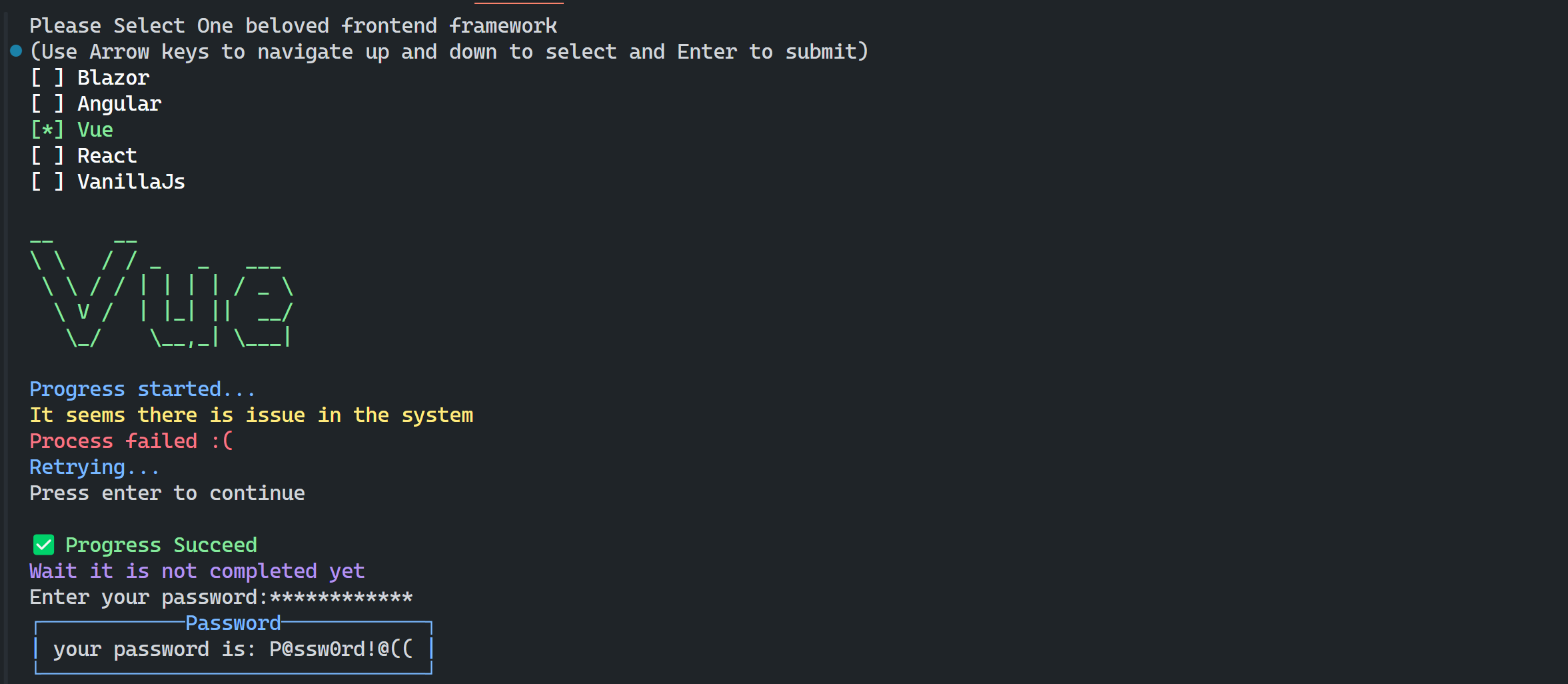
ConsoleR is set of utilities to make awesome console apps in .Net
dotnet add package Doroudi.ConsoleRor
NuGet\Install-Package Doroudi.ConsoleR- Menu
- CheckBox
- AsciiArt
- WriteLine
- Password
- Alert
- Table
- Chat
using System.Text;
using ConsoleR;
using ConsoleR.Chat.Models;
using ConsoleR.Menu.Models;
using Console = ConsoleR.Console;

// AsciiArt: outline, solid strokes or a shadow
Console.AsciiArt("ConsoleR", ConsoleColor.Yellow);
Console.AsciiArt("ConsoleR", AsciiArtStyle.Filled, ConsoleColor.Yellow);
Console.AsciiArt("ConsoleR", AsciiArtStyle.Shadow, ConsoleColor.Cyan, ConsoleColor.DarkCyan);
Console.ReadLine("Press enter to continue");

// WriteLine utilities
Console.Info("Progress started");
Console.Warning("It seems there is issue in the system");
Console.Error("Process failed :(");
Console.Info("Retrying...");
Console.Success("Progress Succeed", showIcon: true);
Console.WriteLine("Wait it is not completed yet", ConsoleColor.Magenta);

// Get Masked Password
var password = Console.Password("Enter your password:");

// Alert
Console.Alert($"your password is: {password}", "Password", ConsoleMessageType.Info);

// Console Menu
string[] frontEndFrameworks = ["Blazor", "Angular", "Vue", "React", "VanillaJs"];
var selectedItem = Console.Menu("Please Select One beloved frontend framework", frontEndFrameworks).Select();
Console.Success("Your choice is: \n\n");
Console.AsciiArt(frontEndFrameworks[selectedItem], ConsoleColor.Yellow);

// Menus with more options than the console window is high are scrollable:
// only the options that fit are shown, the box follows the selection while navigating.
string[] languages = ["C#", "Java", "Python", "JavaScript", "TypeScript", "Go", "Rust", "C++", "Kotlin", "Ruby",
    "Swift", "PHP", "Dart", "Elixir", "Scala", "Haskell", "F#", "Clojure", "Lua", "Perl", "R", "Julia", "Zig", "Nim"];

// The box is sized to the window height and scrolls when needed
var language = Console.Menu("Select your favorite programming language:", languages).Select();

// Or keep the box at a fixed size, five options at a time
var framework = Console.Menu("Select one frontend framework:", 5, frontEndFrameworks).Select();

// Everything is configurable through settings
var settings = new MenuSettings
{
    DisplayText = "Select a plugin:",
    VisibleItems = 5,          // null = as many options as fit into the window
    ShowScrollBox = true,      // null = box only when the options do not fit
    WrapAround = true,
    SelectedColor = ConsoleColor.Cyan,
    OptionColor = ConsoleColor.Gray
};
var selectedPlugin = Console.Menu(settings, ["Linter", "Formatter", "Test runner", "Bundler", "Dev server", "Docs"]).Select();


// Checkbox
string[] plugins = ["Typescript", "Linter", "Nuxt", "Vite"];
var selectedItems = Console.Checkbox("Select feature that you want to install:", plugins).Select();
for (int i = 0; i < selectedItems.Length; i++) {
    var plugin = selectedItems[i];
    Console.WriteLine(plugin.Option, (ConsoleColor)i);
}

// Table
Person[] people = [
    new Person("Saeid",30, "Tehran"),
    new Person("Saman", 25, "Marand"),
    new Person("Alice", 35, "Zurich"),
    new Person("Alex", 40, "Turin")
];

Console.Table(people);


record Person(string Name,int Age, string City);A chat with the history on top and the input box sticky at the bottom of the window. The input grows upwards with the message, longer messages wrap inside it. The bot is a plain delegate, so any model or service can be plugged in, and the look of both sides of the conversation is configured separately.
You: Explain what ConsoleR is and why the chat history stays on top while the
     input box sticks to the bottom of the window.
ConsoleR Bot: ConsoleR is a set of utilities for console apps. The history uses
              every row above the input, so the input never moves out of sight.
╭─ You ───────────────────────────────────────────────────────────────────────╮
│ ask something, Shift+Enter starts a new line                                │
│ Escape leaves the chat                                                      │
╰─────────────────────────────────────────────────────────────────────────────╯
While the answer of the bot is on the way the spinner of the library runs inside the input box:
╭─ You ───────────────────────────────────────────────────────────────────────╮
⠋ Thinking...                                                                 │
╰─────────────────────────────────────────────────────────────────────────────╯
// The reply is called with every message the user sends and returns the answer of the bot.
var chat = Console.Chat(
    message => AskTheModel(message),          // or: async message => await AskTheModelAsync(message)
    new ChatSettings
    {
        InputTitle = "You",                   // text in the border of the input box
        BorderColor = ConsoleColor.DarkGray,
        MaxInputLines = 5,                    // how far the input box grows, null grows it as far as the window allows
        ThinkingText = "Thinking...",         // text the spinner runs in front of
        UserStyle = new ChatMessageStyle      // look of your own messages
        {
            Label = "You",
            Foreground = ConsoleColor.Black,
            Background = ConsoleColor.Cyan
        },
        BotStyle = new ChatMessageStyle       // look of the answers
        {
            Label = "ConsoleR Bot",
            Foreground = ConsoleColor.White,
            Background = ConsoleColor.DarkBlue
        }
    });

chat.AddMessage(ChatRole.Bot, "Hi! Ask me anything, press Escape to leave the chat.");
chat.Run();
Enter sends the message, Shift+Enter (or Ctrl+Enter) starts a new line, Escape leaves the
chat. The arrow keys scroll the history, PageUp and PageDown jump through it, Home and End
move the caret to the beginning and the end of the line it is on, the newest message is always at the
bottom.
An answer that arrives in pieces can grow in the chat, the reply then returns null to say that it
drew its own message:
ConsoleChat? chat = null;
chat = Console.Chat(async message =>
{
    var answer = new StringBuilder();
    chat!.AddMessage(ChatRole.Bot);

    await foreach (var chunk in StreamTheModel(message))
    {
        answer.Append(chunk);
        chat.UpdateLastMessage(answer.ToString());
    }

    return null;
});

chat.Run();The same message in the three styles of the library:
    _     ____   _____          Outline
   / \   |  _ \ |_   _|
  / _ \  | |_) |  | |
 / ___ \ |  _ <   | |
/_/   \_\|_| \_\  |_|

    █     ████   █████         Filled
   █ █   █  █ █ ██   ██
  █ █ █  █ ███ █  █ █
 █ ███ █ █  █ █   █ █
███   ██████ ███  ███

    _     ____   _____         Shadow
   / \   |  _ \ |_   _|
  / _ \  | |_) | ░| |░░░
 / ___ \ |  _ <░░ | |░
/_/   \_\|_| \_\  |_|░
 ░░░░░░░░░░░░░░░░  ░░░
Console.AsciiArt("ART", AsciiArtStyle.Outline, ConsoleColor.Gray);
Console.AsciiArt("ART", AsciiArtStyle.Filled, ConsoleColor.Yellow);
Console.AsciiArt("ART", AsciiArtStyle.Shadow, ConsoleColor.Cyan, ConsoleColor.DarkCyan);