Repository navigation
Add a "top functions" call tree view #15
Description

In a "top functions" view, all functions are displayed in a flat list (no tree structure), sorted by "inclusive time", i.e. sorted by the number of samples where this function is present anywhere on the stack.
Example:
Normal:

total self
19    -     (root)
19    -       RunLoop
10    -         ProcessCircles
10    2           ProcessElement
 8    8             Circle::Circumference()
 9    -         ProcessSquares
 9    3           ProcessElement
 6    6             Square::Circumference()

Inverted:

total self
8     8     Circle::Circumference()
8     -       ProcessElement
8     -         ProcessCircles
8     -           RunLoop
8     -             (root)
6     6     Square::Circumference()
6     -       ProcessElement
6     -         ProcessSquares
6     -           RunLoop
6     -             (root)
5     5     ProcessElement
5     -       ProcessSquares
5     -         RunLoop
5     -           (root)
5     -       ProcessCircles
5     -         RunLoop
5     -           (root)

Top functions:

total self
19    -     (root)
19    -     RunLoop
19    5     ProcessElement
10    -     ProcessCircles
 9    -     ProcessSquares
 8    8     Circle::Circumference()
 6    6     Square::Circumference()
In this example, ProcessElement is near the top of the list, and easy to find. In the current call tree you have to look for it under two different stacks.
I think we should have such a mode. We could make it a different mode inside the existing Call Tree tab, or we could have a new tab for it.
As a follow up, outside of the scope of this issue, it should would be nice to have the following abilities for each function:
- Restrict the profile to only show samples that contained this function in the stack
- Do the inverse of 1, i.e. remove all samples containing this function in the stack
- Look at the call tree of functions called by the selected function
- Look at the (inverted) call tree of functions that call the selected function
For example, we could split the tab three ways: the list on the left, and two tree views on the right, above each other, with the upper one showing 3 and the lower one showing 4.
┆Issue is synchronized with this Jira Task
Activity
mikeconley commentedon Jul 4, 2017
FWIW, Jan de Mooij built an external tool to help find the top functions:
https://jandem.github.io/profileviewer/
Would it be possible to use that as a starting point to get something like this added to perf.html?
julienw commentedon Apr 25, 2018
The hotspot tool has a nice view that is similar to what Markus suggested:

julienw commentedon Apr 25, 2018
Note that the view is sortable both by self time or children-included time.
digitarald commentedon Apr 26, 2019
@mikeconley is that the Heaviest Stack Trace sidebar from Instruments
If not, Instruments has also the Top Functions view options for the call tree. It also sounds similar to your description, as Top Functions is defined as
julienw commentedon Apr 26, 2019
See also this butterfly view experiment (where functions are ordered by self time instead of running time like it should)
digitarald commentedon Feb 20, 2020
This also came up in user feedback again as a list of hot spots that help to orient in a profile.
julienw commentedon Feb 21, 2020
Here is the updated butterfly view experiment, this time using the running time.
digitarald commentedon Feb 21, 2020
I like it, but the UI does take its own tab and we'll have to train users on its own workflow.
I wonder if a v0 for this could be simpler. XCode solves it as checkbox in the call tree; which exposes it similarly to "Invert Call Tree" – which seems nice as it has a similar explorational use case.
@mstange @mikeconley would love your input on this Call Tree-based approach.
mstange commentedon Feb 21, 2020
I don't have a strong opinion. But I think a tri-state selector in the Call Tree tab might work:
(actual names to be discussed)
julienw commentedon Feb 21, 2020
Interestingly I thought of that too :-) The tab was a cheap way to get it out but I think we can do better.
smaug---- commentedon May 18, 2020
RotateRight's Zoom used to have rather great butterfly view
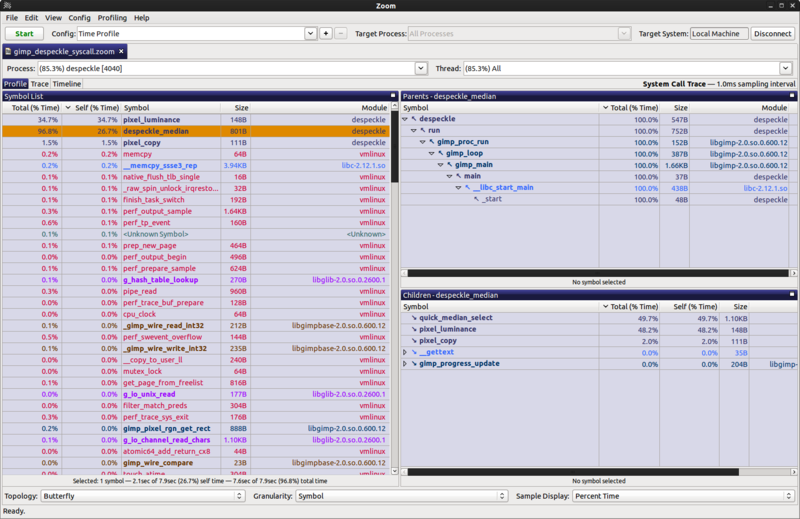
jandem commentedon Feb 28, 2021
Could we start with the most simple version of this, just the top functions list, no butterfly view?
IMO this would make the profiler a lot more effective. I feel kind of lost when looking at complicated profiles without this view (I use it all the time with other profilers such as Instruments).
gregtatum commentedon Mar 1, 2021
I'm a bit confused by the top functions view. Is this any different than the inverted view in the call tree?
mstange commentedon Mar 1, 2021
Here's an example: (edit: I've also added this to the issue description now)
The top functions view calls attention to
ProcessElement, which is present in many samples. The inverted call tree view doesn't call attention toProcessElementbecause it doesn't have much self time.julienw commentedon Mar 1, 2021
The inverted view orders by the self time, the functions view orders by the running time.
Thanks for the heads-up, I'll put that in our internal backlog
julienw commentedon Mar 2, 2021
@jandem @mstange would cleaning up the work linked in #15 (comment) be good enough as a first step? (see #2388 for the list of left-over tasks).
I feel like it needs some more relationships with the other panels, but this can also be built on top of it later.
mstange commentedon Mar 2, 2021
Yes, I think that would be a good first step. You could even drop the side panels for now and just have the top functions list. But we do need the performance to be addressed, see my comment in the PR.
jandem commentedon Mar 2, 2021
That looks amazing. Thanks!
mstange commentedon Dec 8, 2021
Here's a profile where a top functions view would work very well: https://share.firefox.dev/3rM8fEp
Some modules get loaded repeatedly from different stacks. For example,
aria-query/lib/index.jsshows up in different stacks: https://share.firefox.dev/3rLw530A top functions view would show the modules in a flat list.
gregtatum commentedon Dec 9, 2021
Somewhat related, I was wanting to filter to just a single function the other day profiling
mozilla::intlcode, and I think a top functions would provide that if I could filter for functions on it.parttimenerd commentedon Aug 27, 2022
I propose to add a simple version of this in #4205.
mstange commentedon Nov 26, 2024
Implementation notes:
A naive implementation of this would walk the entire stack for each sample, and accumulate the sample's weight into a total-per-function array. However, it would also need to create a Set of functions for the current sample, to ensure that, if the same function is present in the stack multiple times, it only gets counted once.
Walking the entire stack for each sample is costly. Maintaining a set is costly too.
We should find something we can precompute based on the non-inverted call node table, so that if the sample information changes (e.g. because the user's preview range selection changes), it will be quick to recompute the total-per-function information.
I think a performant implementation of this could work as follows:
DeduplicatedCallNodeTablefor now.IndexIntoCallNodeTabletoIndexIntoDeduplicatedCallNodeTable.FunctionListTimingsas follows:callNodeSelf, which we already compute for the regular call tree.DeduplicatedCallNodeTabletree, like we do for the non-inverted call tree, to create atotalper node in this tree.totalto the per-functiontotalof the node's function.This gives you a per-function total that's relatively cheap to update as the selection changes.
The tricky part is how to create
DeduplicatedCallNodeTableefficiently. When looking at a call node from the original call node table, we need to add this node to the deduplicated table only if the node's function isn't already present in the node's ancestors. We could create a JSSetfor each node, but that seems very memory intensive. We could try to use a bloom filter.mstange commentedon Nov 28, 2024
I've prototyped the described approach in #5233.