[material_ui] Stop MenuAnchor from covering its anchor - #12851
Open
RootHex200 wants to merge 1 commit into
Open
Conversation


A vertical menu is placed either above or below its anchor, but its height
was only capped to the size of the whole overlay. When a menu was too tall
to fit above an anchor near the bottom of the screen, the positioning logic
fell through to pinning the menu to the bottom edge, which drew it straight
over the anchor and hid it completely.

Cap the height of a vertical menu to the larger of the space above and the
space below the anchor, using the same bounds the positioning logic uses.
A menu that no longer fits is shortened and scrolls instead of growing past
the anchor.

Addresses flutter/flutter#161474
 github-actions
Bot
added
p: material_ui
triage-design
github-actions
Bot
added
p: material_ui
triage-design
![gemini-code-assist[bot]](https://avatars.githubusercontent.com/in/956858?s=60&v=4)

Contributor
There was a problem hiding this comment.
Code Review
This pull request modifies the getConstraintsForChild method in _MenuLayout to cap the height of vertical menus to the available space above or below the anchor, preventing the menu from covering the anchor when it is too tall. It also adds a corresponding regression test and a changelog entry. There are no review comments, and I have no feedback to provide.
This file contains hidden or bidirectional Unicode text that may be interpreted or compiled differently than what appears below. To review, open the file in an editor that reveals hidden Unicode characters.
Learn more about bidirectional Unicode characters
Sign up for free
to join this conversation on GitHub.
Already have an account?
Sign in to comment
1 participant

Add this suggestion to a batch that can be applied as a single commit.This suggestion is invalid because no changes were made to the code.Suggestions cannot be applied while the pull request is closed.Suggestions cannot be applied while viewing a subset of changes.Only one suggestion per line can be applied in a batch.Add this suggestion to a batch that can be applied as a single commit.Applying suggestions on deleted lines is not supported.You must change the existing code in this line in order to create a valid suggestion.Outdated suggestions cannot be applied.This suggestion has been applied or marked resolved.Suggestions cannot be applied from pending reviews.Suggestions cannot be applied on multi-line comments.Suggestions cannot be applied while the pull request is queued to merge.Suggestion cannot be applied right now. Please check back later.
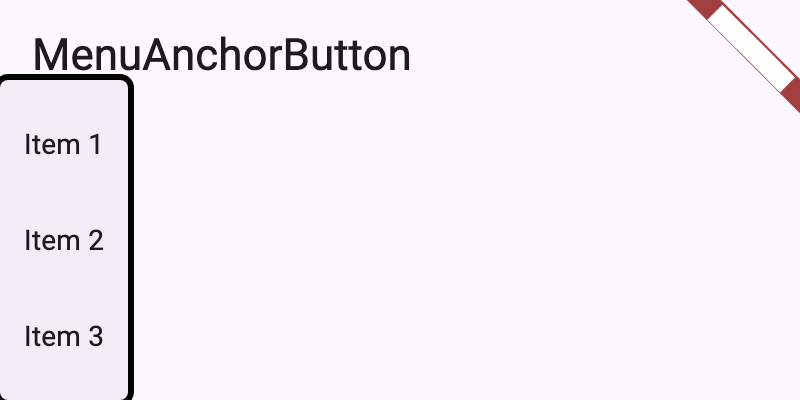
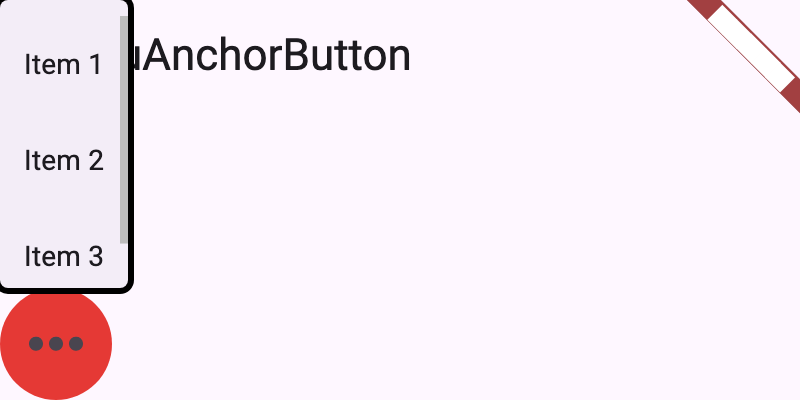
When a menu opens upwards and it is too tall to fit above its button, the menu is pushed down to the bottom edge of the screen and covers the button completely. You cannot see the button you just tapped.
The reason is that
MenuAnchoronly limited the menu height to the size of the whole screen. But a menu can only use the space above the button or the space below it, never both. So when the menu did not fit above, the positioning code ran out of options and pinned it to the bottom edge, right on top of the button.Now the menu height is limited to the bigger of those two spaces. A menu that is taller than that becomes shorter and scrolls, instead of growing over the button.
Addresses flutter/flutter#161474
before:
after:
I added a test in
test/menu_anchor_test.dartthat puts a menu at the bottom of a short screen and checks that the bottom of the menu never goes past the top of the button.Pre-Review Checklist
[shared_preferences]///).If you need help, consider asking for advice on the #hackers-new channel on Discord.
Note: The Flutter team is currently trialing the use of Gemini Code Assist for GitHub. Comments from the
gemini-code-assistbot should not be taken as authoritative feedback from the Flutter team. If you find its comments useful you can update your code accordingly, but if you are unsure or disagree with the feedback, please feel free to wait for a Flutter team member's review for guidance on which automated comments should be addressed.