The official Lumida CLI reads your health data from the terminal: summaries over a day or a period, sleep history with its trend, and JSON output you can pipe into your own scripts.
- Node.js 22 or later
- a Lumida account connected to Google Health
npm install --global lumida-cliThe installed command is lumida.
lumida login
lumida status
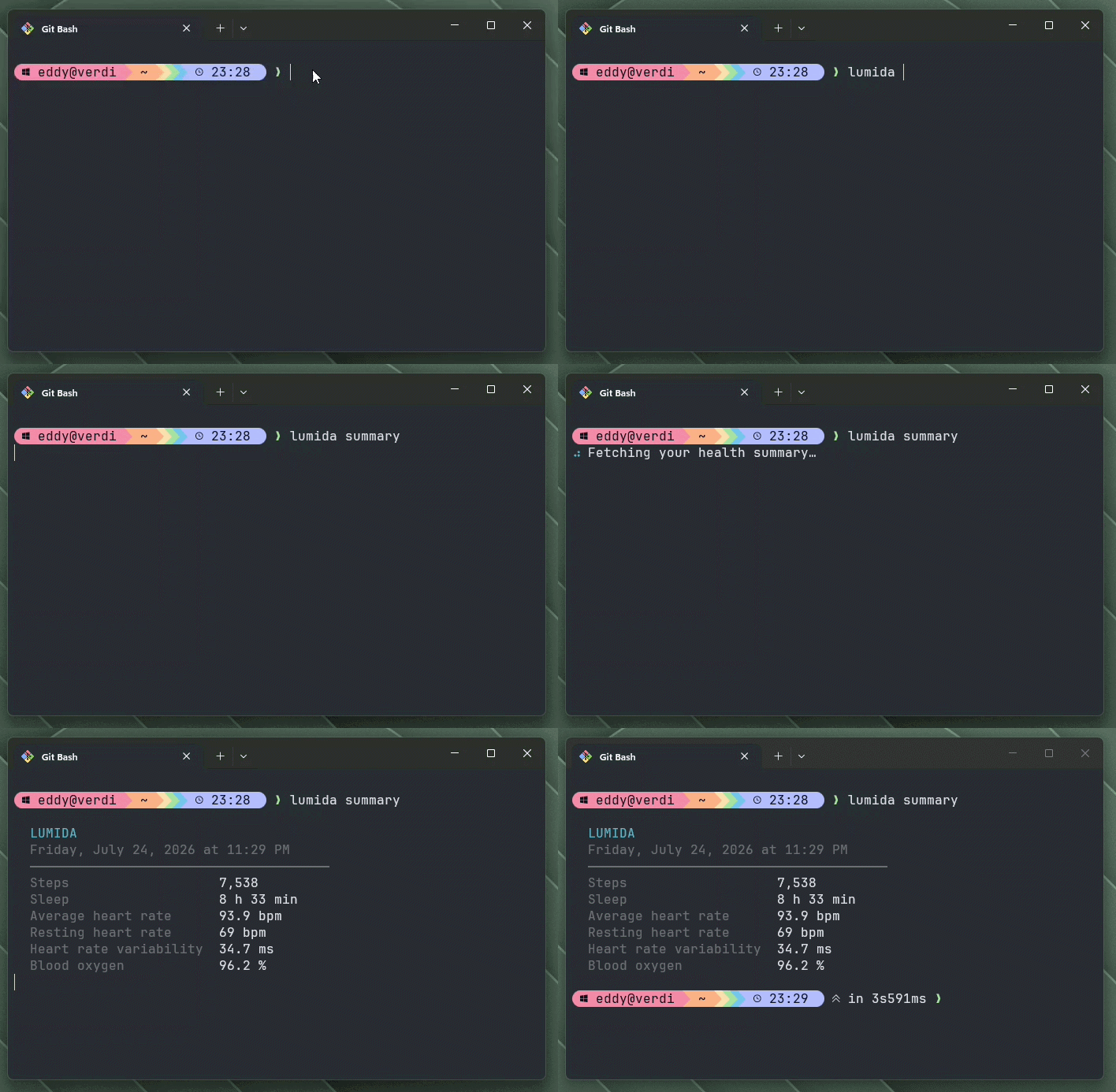
lumida summary
lumida summary --date 2026-07-01
lumida summary --date yesterday
lumida summary --days 30
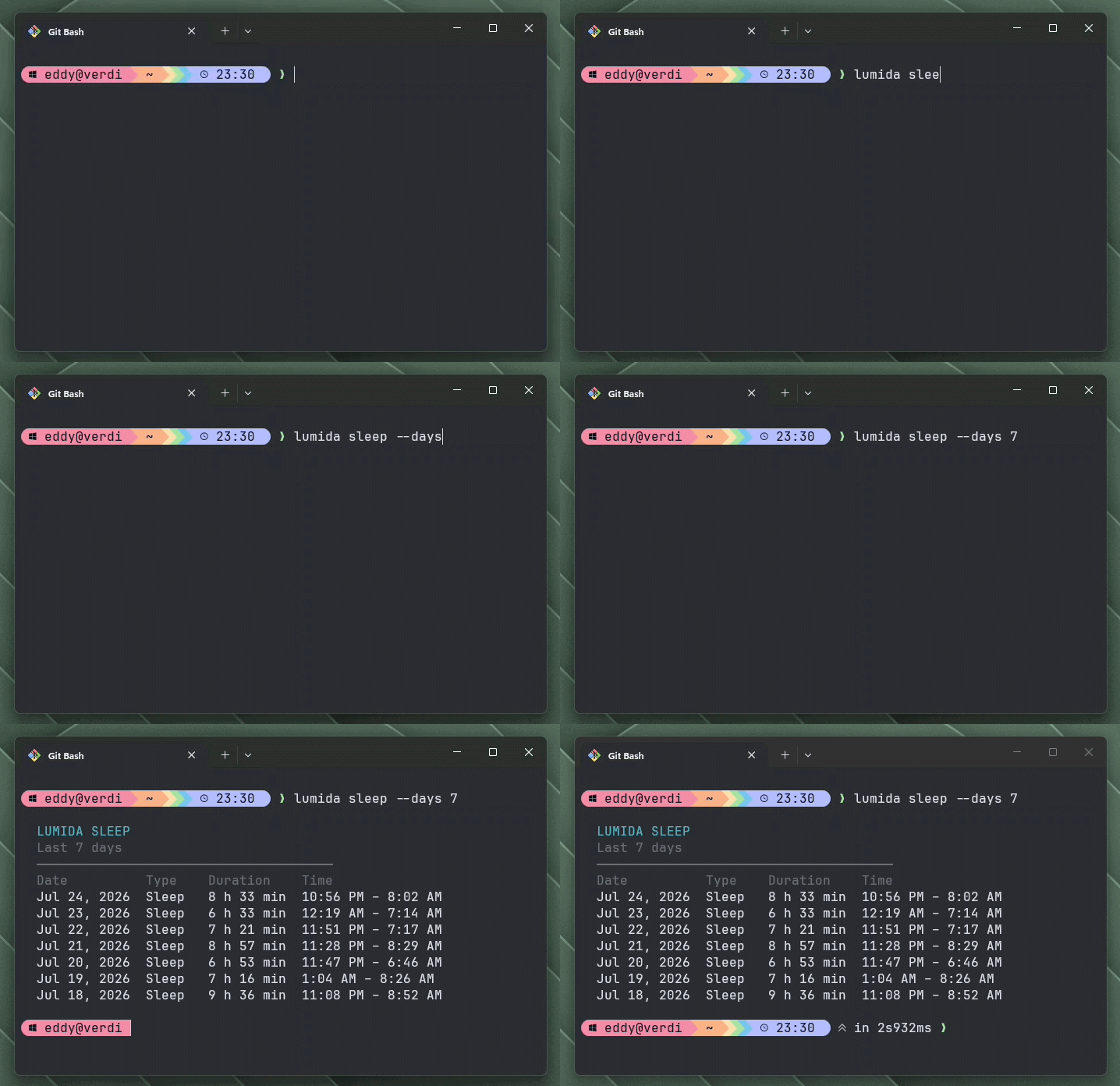
lumida sleep --days 7
lumida logoutloginopens Lumida in your browser and waits for your authorization. Your password is never entered in the terminal, and the session is stored in the operating system's native credential store.statusshows the account, CLI session expiration, and Google Health status.summaryshows a compact health summary for the last 24 hours.summary --date <YYYY-MM-DD>shows the summary for one local calendar day. It also acceptstodayandyesterday, resolved in your own time zone.summary --days <number>summarizes a rolling window of 1 to 90 days.sleep --days <number>shows sleep history for 1 to 365 days. It defaults to 7 days.logoutrevokes the server session before removing it locally.
--date and --days describe the same thing and cannot be combined.
Examples:
lumida sleep
lumida sleep --days 30
lumida sleep --days 365
lumida summary --date 2026-07-01
lumida summary --days 7--date accepts today and yesterday, resolved in your own time zone:
lumida summary --date yesterday --jsonThis exists for scheduled jobs. Computing the previous day in the shell is not
portable: GNU date writes it -d yesterday, BSD date writes it -v-1d, so
one cron line cannot serve both.
Nothing else is accepted. A form such as -3d would be read as an option
rather than as the value of --date, and --days already covers rolling
windows.
Sleep history is a single list of sessions, so a full year is one request. A summary instead aggregates rolled-up metrics that Google caps at 14 days per heart-rate request, so a long period becomes a chain of upstream calls. The 90-day ceiling keeps a summary responsive. Use the web app for longer periods.
status, summary and sleep accept --json and print the raw response on
standard output:
lumida summary --json
lumida summary --days 30 --json
lumida sleep --days 90 --json
lumida status --json
The output is meant to be piped. Data goes to standard output, every diagnostic goes to standard error, and the exit code is non-zero on failure, so a script can tell "no data" from "not connected":
lumida summary --json | jq .steps

# Nights under seven hours over the last month
lumida sleep --days 30 --json \
  | jq '[.sessions[] | select(.isNap | not) | select(.minutesAsleep < 420)] | length'

# Status bar, silently ignoring a disconnected CLI
lumida summary --json 2>/dev/null | jq -r '"\(.steps) steps"' || true
status --json adds a connected boolean so a script can branch without
parsing a message:
{
  "connected": true,
  "account": { "email": "you@example.com" },
  "session": { "expiresAt": "2026-08-12T09:30:00.000Z" },
  "googleHealth": { "connected": true, "accessStatus": "approved" }
}
With no stored session it prints { "connected": false } and exits
successfully. Not being connected is an answer, not a failure.
sleep renders a Trend column: one bar per night, scaled to the longest night
of the period.
  Date          Type    Duration    Time                Trend
  Aug 4, 2026   Sleep   7 h 30 min  11:12 PM – 6:42 AM  ▄▄▄▄▄▄▄▄▄▄▄▄▄▄▄▄▄▄▄
  Aug 3, 2026   Sleep   6 h 10 min  12:05 AM – 6:15 AM  ▄▄▄▄▄▄▄▄▄▄▄▄▄▄▄
  Aug 2, 2026   Nap     0 h 45 min  2:30 PM – 3:15 PM   ▄▄▄
  Aug 1, 2026   Sleep   8 h 05 min  10:40 PM – 6:45 AM  ▄▄▄▄▄▄▄▄▄▄▄▄▄▄▄▄▄▄▄▄
  Jul 31, 2026  Sleep   5 h 30 min  11:50 PM – 5:20 AM  ▄▄▄▄▄▄▄▄▄▄▄▄▄▄
  Jul 30, 2026  Sleep   7 h 50 min  11:05 PM – 7:10 AM  ▄▄▄▄▄▄▄▄▄▄▄▄▄▄▄▄▄▄▄
  ──────────────────────────────────────
  Average night         7 h 01 min
  Nights recorded       5 of 7
  Naps                  1
A night without a measured duration draws no bar.
Over more than one day, the table ends on its aggregates. Read Nights recorded first: a night with no data has no row at all, so nothing else in the
table tells you the period is incomplete. Naps are counted apart and left out of
the average.
The CLI is read-only. Its session can never modify your account, disconnect Google Health, or reach administration features, and the server returns only the aggregated values shown above: no workout identifiers, GPS traces, sleep segments, or device identifiers.
Your session token is stored only in your operating system's credential vault (Keychain, Credential Manager, or Secret Service). There is no plaintext fallback file, and each server origin gets its own entry.