tqa correlates code coverage with mutation testing to produce a Test Strength Index (TSI): the percentage of covered lines where mutants are actually killed. A line with coverage but no killed mutants means your tests execute the code but don't verify its behaviour.
pip install tqatqa analyze --coverage coverage.xml --mutmut mutmut.xml
tqa analyze --coverage coverage.xml --mutant .mutant/results# Coverage — outputs coverage.xml in the current directory
python -m pytest --cov --cov-report=xml:coverage.xml tests/
# Mutation — outputs .mutmut-cache in the current directory
mutmut run
mutmut junitxml > mutmut.xml # export to mutmut.xmltqa analyze --coverage coverage.xml --mutmut mutmut.xmlFor survived mutmut mutants, TQA may infer a broad mutation category from the unified diff embedded in the JUnit failure text. This is a conservative heuristic used only to improve test recommendations. If the diff is missing or ambiguous, TQA leaves the mutation description empty and uses the generic recommendation.
# Mutation — Mutant writes native session JSON to .mutant/results/
mutant run --use rspec --usage opensource --require ./lib 'Person*'
tqa analyze --coverage coverage.xml --mutant .mutant/resultsTQA reads Mutant session JSON files directly and supports two session formats:
- Original format — results carry a nested
test_resultdict with astatusfield (alive,killed, etc.). - Newer format — results carry a
mutation_resultdict and acriteria_resultdict; TQA mapstest_result,timeout, andprocess_abortfields to the appropriate status automatically.
Surviving mutations are shown with the operator name, subject, and a compact diff summary when present. If Mutant runs inside a Docker container or CI environment that mounts source under /work/, TQA strips the /work/ prefix from file paths automatically so they match your project layout.
# Coverage — Jest writes coverage/lcov.info by default
jest --coverage

# Mutation — Stryker writes reports/mutation/mutation.json by default
stryker run
tqa analyze --lcov coverage/lcov.info --stryker reports/mutation/mutation.jsonIf you use NYC instead of Jest:
nyc report --reporter=lcov # writes coverage/lcov.info# Coverage + mutation — both produced by a single Maven build
mvn test jacoco:report org.pitest:pitest-maven:mutationCoverage
# Coverage: target/site/jacoco/jacoco.xml
# Mutations: target/pit-reports/<timestamp>/mutations.xmltqa analyze \
--coverage target/site/jacoco/jacoco.xml \
--pit target/pit-reports/*/mutations.xml| Tool | Default output path |
|---|---|
| pytest-cov | coverage.xml (configure with --cov-report=xml:<path>) |
| mutmut | .mutmut-cache (DB); export with mutmut junitxml > mutmut.xml |
| Mutant | .mutant/results session JSON files |
| Jest | coverage/lcov.info |
| Vitest | coverage/lcov.info (requires @vitest/coverage-v8 and reporter: ['lcov'] in config) |
| NYC | coverage/lcov.info |
| Stryker | reports/mutation/mutation.json |
| JaCoCo | target/site/jacoco/jacoco.xml |
| PIT | target/pit-reports/<timestamp>/mutations.xml |
tqa analyze [OPTIONS]

  --config PATH       tqa.toml config file (multi-technology projects)
  --coverage PATH     Cobertura XML (pytest-cov, JaCoCo)
  --lcov PATH         lcov.info (Jest, Vitest, NYC)
  --stryker PATH      Stryker JSON report
  --mutmut PATH       mutmut JUnit XML (mutmut junitxml)
  --mutant PATH       Mutant session JSON file or .mutant/results directory
  --pit PATH          PIT mutations.xml
  --format [console|github|sonarcloud|json]  Output format (default: console)
  --fail-under FLOAT  Exit 1 if TSI is below this percentage
  --export-svg PATH   Save the console output as an SVG image
--export-svg uses Rich's built-in SVG export to produce a styled terminal image — useful for embedding live output in a README. See the GitHub Actions integration section for an example of auto-updating it on every merge.
Multiple flags can be combined — tqa merges coverage and mutation data by file path.
When a project has more than one technology stack (e.g. a Node.js server and a Svelte/React frontend), use a tqa.toml config file to define named components. Each component is analyzed independently and gets its own section in the report.
[components.server]
lcov    = "reports/server/lcov.info"
stryker = "reports/server/mutation.json"

[components.client]
lcov    = "reports/client/lcov.info"
stryker = "reports/client/mutation.json"
Then invoke tqa with:
tqa analyze --config tqa.toml --format githubThe flat flags (--lcov, --coverage, etc.) remain available as a shorthand for single-stack projects and produce the same output as before. Use --config whenever you need separate per-component metrics.
Vitest does not produce coverage by default. You need the @vitest/coverage-v8 package and a coverage config:
npm install --save-dev @vitest/coverage-v8In vite.config.js (or vitest.config.js):
export default {
  test: {
    coverage: {
      provider: 'v8',
      reporter: ['lcov'],
      reportsDirectory: 'reports/coverage',
    },
  },
}
Add a separate script for coverage so plain npm test stays fast in local development:
"scripts": {
  "test": "vitest run",
  "test:coverage": "vitest run --coverage"
}
Run coverage:
npm run test:coverage
# writes: reports/coverage/lcov.info
Without this, the client component will show no coverage data and TSI will be N/A for all client files.
Four things must be true for both stacks to appear in the report:
- The
tqajob mustneedsboth upstream jobs — otherwise it may run before one stack finishes. - Both artifact sets must be downloaded — one
download-artifactstep per stack. - A
tqa.tomlmust be committed to the repo pointing at the downloaded paths. - Artifact uploads must flatten the directory structure —
actions/download-artifactpreserves the path relative to the repo root, so uploadingserver/coverage/lcov.infoand downloading toreports/serverlands atreports/server/server/coverage/lcov.info. Add a collect step to copy reports to a flat staging directory before uploading.
jobs:
  server-test:
    steps:
      - uses: actions/checkout@v4
      - run: npx c8 --reporter=lcov node --test
        working-directory: server
      - run: npx stryker run
        working-directory: server
      - name: Collect server reports
        run: |
          mkdir -p artifacts
          cp server/coverage/lcov.info artifacts/lcov.info
          cp server/reports/mutation/mutation.json artifacts/mutation.json
      - uses: actions/upload-artifact@v4
        with:
          name: server-reports
          path: artifacts/

  client-test:
    steps:
      - uses: actions/checkout@v4
      - run: npm install
        working-directory: client
      - run: npm run test:coverage           # see Vitest section above
        working-directory: client
      - run: npx stryker run
        working-directory: client
      - name: Collect client reports
        run: |
          mkdir -p artifacts
          cp client/reports/coverage/lcov.info artifacts/lcov.info
          cp client/reports/mutation/mutation.json artifacts/mutation.json
      - uses: actions/upload-artifact@v4
        with:
          name: client-reports
          path: artifacts/

  tqa:
    needs: [server-test, client-test]      # wait for BOTH jobs
    permissions:
      pull-requests: write
    steps:
      - uses: actions/checkout@v4          # needed to read tqa.toml
      - uses: actions/download-artifact@v4
        with:
          name: server-reports
          path: reports/server
      - uses: actions/download-artifact@v4
        with:
          name: client-reports
          path: reports/client
      - run: pip install tqa
      - run: tqa analyze --config tqa.toml --format github > tqa-summary.md
      # ... comment step as in the single-job example
With a tqa.toml in the repo root (paths match the flattened artifact structure above):
[components.server]
lcov    = "reports/server/lcov.info"
stryker = "reports/server/mutation.json"

[components.client]
lcov    = "reports/client/lcov.info"
stryker = "reports/client/mutation.json"Mutation testing is slow. The recommended pattern is to run coverage on every PR for fast feedback and run mutation tests on a weekly schedule for deeper analysis. This keeps PR pipelines short while still giving you regular TSI data.
.github/workflows/ci.yml — runs on every PR and push to main:
- name: Run tests with coverage
  run: python -m pytest --cov --cov-report=xml:coverage.xml tests/

- name: Run TQA (coverage only)
  run: tqa analyze --coverage coverage.xml --format github > tqa-summary.md

- name: Comment on PR
  if: github.event_name == 'pull_request'
  run: |
    COMMENT_ID=$(gh api repos/${{ github.repository }}/issues/${{ github.event.number }}/comments \
      --jq '[.[] | select(.user.login == "github-actions[bot]" and (.body | startswith("## TQA Report Summary"))) | .id] | last // empty')
    if [ -n "$COMMENT_ID" ]; then
      gh api repos/${{ github.repository }}/issues/comments/"$COMMENT_ID" \
        -X PATCH -f body="$(cat tqa-summary.md)"
    else
      gh api repos/${{ github.repository }}/issues/${{ github.event.number }}/comments \
        -X POST -f body="$(cat tqa-summary.md)"
    fi
  env:
    GITHUB_TOKEN: ${{ secrets.GITHUB_TOKEN }}
.github/workflows/mutation.yml — runs weekly and updates the README SVG:
name: Weekly Mutation Tests
on:
  schedule:
    - cron: '0 9 * * 1'   # Every Monday at 09:00 UTC
  workflow_dispatch:        # Allow manual runs

permissions:
  contents: write

jobs:
  mutation:
    runs-on: ubuntu-latest
    steps:
      - uses: actions/checkout@v4
      - run: pip install -e .[dev]

      - name: Run tests and collect coverage
        run: pytest tests/ --cov=tqa --cov-report=xml:coverage.xml

      - name: Run mutation tests
        run: mutmut run
        continue-on-error: true   # exits non-zero when mutants survive

      - name: Export mutation results
        run: mutmut junitxml > mutmut.xml

      - name: Analyze with TQA
        run: tqa analyze --config tqa.toml --format github > tqa-summary.md

      - name: Post to job summary
        run: cat tqa-summary.md >> $GITHUB_STEP_SUMMARY

      - name: Update README SVG
        run: tqa analyze --config tqa.toml --export-svg sample-output.svg
      - run: |
          git config user.name "github-actions[bot]"
          git config user.email "github-actions[bot]@users.noreply.github.com"
          git checkout --orphan tmp-build-artifacts
          git rm -rf --cached .
          git add sample-output.svg
          git commit -m "update sample output"
          git push --force origin HEAD:build-artifacts
        env:
          GH_TOKEN: ${{ secrets.GITHUB_TOKEN }}
workflow_dispatch lets you trigger a mutation run manually from the Actions UI at any time — useful after a large refactor or before a release. The job summary makes weekly TSI data visible in Actions without needing a PR.
If your mutation suite is fast enough, you can include it in the PR pipeline. Gate the XML export on a successful run to avoid misleading zero-mutation data:
- name: Run mutation tests
  id: mutmut
  run: mutmut run
  continue-on-error: true   # mutmut exits non-zero when mutants survive

- name: Export mutation results
  if: steps.mutmut.outcome == 'success'
  run: mutmut junitxml > mutmut.xml

- name: Run TQA
  run: |
    tqa analyze \
      --coverage coverage.xml \
      $([ -f mutmut.xml ] && echo '--mutmut mutmut.xml') \
      --format github > tqa-summary.md
Why the export step is conditional: mutmut run exits non-zero whenever any mutant survives (the normal case), so continue-on-error: true is required. However, if mutmut crashes — OOM, timeout, missing source files — the exit code is still non-zero but the database is absent or corrupt. Running mutmut junitxml in that state produces an empty or invalid XML file, which TQA would read as "zero mutants tested". Gating the export on steps.mutmut.outcome == 'success' ensures the XML is only written when mutmut completed a real run.
When coverage and mutation reports are produced in one job and consumed in another, upload them as an artifact and locate them with find rather than hardcoding the download path:
jobs:
  test:
    steps:
      - run: npx c8 --reporter=lcov node --test
      - run: npx stryker run
      - uses: actions/upload-artifact@v4
        with:
          name: reports
          path: |
            coverage/lcov.info
            reports/mutation/mutation.json

  tqa:
    needs: test
    permissions:
      pull-requests: write
    steps:
      - uses: actions/download-artifact@v4
        with:
          name: reports
          path: reports
      - run: pip install tqa
      - run: |
          LCOV=$(find reports -name "lcov.info" | head -1)
          STRYKER=$(find reports -name "mutation.json" | head -1)
          tqa analyze \
            ${LCOV:+--lcov "$LCOV"} \
            ${STRYKER:+--stryker "$STRYKER"} \
            --format github > tqa-summary.md
      # ... comment step as above
Using find avoids depending on the exact directory structure that download-artifact produces.
When using --config tqa.toml and mutations might not run: a static committed tqa.toml lists mutation sources unconditionally, so TQA will error or report misleading zero-mutation data when the files are absent. Generate a runtime config instead:
- name: Generate runtime TQA config
  run: |
    {
      echo '[components.python]'
      echo 'cobertura = "coverage.xml"'
      [ -f mutmut.xml ] && echo 'mutmut = "mutmut.xml"'
      echo ''
      echo '[components.frontend]'
      echo 'lcov = "frontend/coverage/lcov.info"'
      [ -f frontend/reports/mutation/mutation.json ] && echo 'stryker = "frontend/reports/mutation/mutation.json"'
    } > tqa-runtime.toml

- name: Run TQA
  run: tqa analyze --config tqa-runtime.toml --format sonarcloud >> $GITHUB_STEP_SUMMARY
The shell [ -f <path> ] test is POSIX-portable and works on every GitHub-hosted runner. Only sources whose artifact files are present on disk are included; components that did not produce output are omitted from the report rather than shown as zero.
Use --fail-under 80 on the tqa analyze line to enforce a minimum TSI quality gate.
The image below is generated automatically from this project's own CI run on every merge to main.
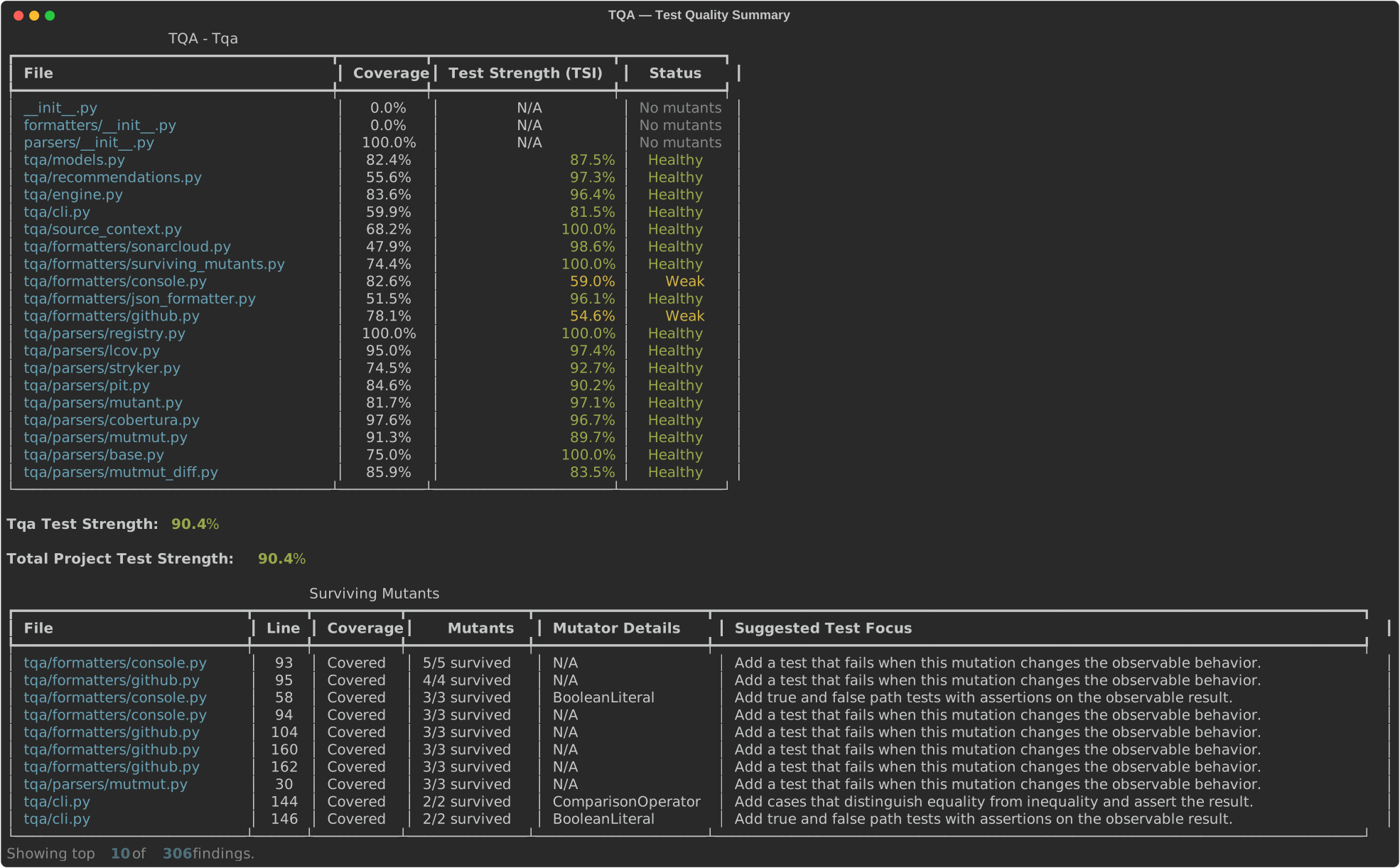
N/A in the TSI column means no mutation data was loaded for that file — coverage alone cannot measure test strength.
TSI status thresholds
| Status | TSI | Meaning |
|---|---|---|
| Healthy | ≥ 80% | Tests catch most mutations — good signal |
| Weak | 50–79% | Tests run the code but miss many mutations |
| Blind | < 50% | Tests cover lines but verify almost nothing |
What TSI measures — and what it doesn't
TSI is calculated only over lines that your coverage report marks as covered. Uncovered lines are excluded from the score entirely — they do not count as 0%.
This is intentional. TSI answers the question "how effective are the tests you have?", not "how completely is your project tested?". A project with 40% line coverage and a TSI of 90% has excellent tests for the code it exercises, but large untested areas — two different problems that call for different fixes.
Because of this, a high TSI is not a signal that you can stop adding tests. It means the tests you have are doing their job well. To understand how much of your codebase still lacks any tests at all, read TSI alongside your coverage report: coverage tells you where tests are absent; TSI tells you whether the tests that exist are meaningful.
Surviving mutants on uncovered lines are labelled Uncovered in the output. They represent a harder gap — no test runs that code at all — so the recommended action is to add coverage first, then use TSI to verify the new tests actually assert behaviour.
Produces a Markdown report suitable for a PR comment or a GitHub Actions job summary, plus ::warning annotations for lines with 100% coverage but 0% mutants killed.
The report structure is:
- Headline metric (Total Project Test Strength) at the top
- Per-file breakdown in a collapsible
<details>block - Status column uses emoji: ✅ Healthy / 🟡 Weak / 🔴 Blind
- Surviving mutants table with file, line, mutator details, and rule-based test suggestions
- Critical gaps table (if any) at the bottom
Suggestions are deterministic heuristics based on the mutator name and optional source-line context. They are meant to point at the missing test signal, not to guarantee a complete test case.
Produces a machine-readable JSON document containing the full analysis result — useful for scripting, dashboards, or tooling built on top of tqa. The document includes top-level tsi, per-component and per-file metrics, a surviving_mutants array, and a critical_gaps array.
tqa analyze --coverage coverage.xml --mutmut mutmut.xml --format json > tqa.jsonOnly lines with mutation data appear in the per-file lines array; fully covered-only lines are omitted to keep the output compact.
Produces the same Markdown summary as --format github and writes a
sonar-generic-issues.json file for SonarCloud's generic external issue
import. Configure SonarCloud to read it with:
sonar.externalIssuesReportPaths=sonar-generic-issues.jsonEach surviving mutant is exported as a line-level external issue using the
tqa engine id and surviving-mutant rule id. TQA keeps the JSON focused on
machine-ingestible findings; the Markdown summary remains the human-readable
report.
Pipe the output to $GITHUB_STEP_SUMMARY to make the report visible in the Actions UI on every run, including pushes to main where there is no PR to comment on:
- run: tqa analyze --config tqa.toml --format github > tqa-summary.md
- run: cat tqa-summary.md >> $GITHUB_STEP_SUMMARY
- name: Comment on PR
  if: github.event_name == 'pull_request'
  # ... comment step as below
The two outputs are independent — write to both, or either one alone.
Use --export-svg to keep a live screenshot of tqa's output in your README. The recommended place for this is the weekly mutation job (see above), since the SVG is most useful when it includes both coverage and TSI data. The push step at the end of the weekly mutation workflow example already handles this.
Reference it in your README using the raw URL:
The build-artifacts branch is a CI-only artifact store — never merge it into main:
- It is an orphan branch (no shared history with
main). - It is force-pushed on every merge to
main, so its history is always exactly one commit. - Merging it would flood
mainwith auto-generated binary content and corrupt the git history.
To enforce this technically, add the prevent-build-artifacts-merge job below to your workflow and mark it as a required status check in your branch protection / ruleset settings:
  prevent-build-artifacts-merge:
    if: github.head_ref == 'build-artifacts'
    runs-on: ubuntu-latest
    steps:
      - name: Block merge from build-artifacts
        run: |
          echo "::error::build-artifacts is a CI-only artifact branch. It must never be merged into main."
          exit 1
Pushing to a dedicated orphan branch sidesteps branch protection rules that require pull requests on the default branch. contents: write is required; scope it to this job to keep other jobs read-only.
pip install -e .[dev]   # editable install required for coverage to trace local source files
python -m pytest tests/