Wraps any command and converts the file paths, URLs, and symbol names in its output to clickable OSC 8 hyperlinks.
go install github.com/mash/osc8wrap@latestDownload from GitHub Releases.
osc8wrap [options] <command> [args...]
<other command> | osc8wrap [options]
osc8wrap sessions [--format FMT] [query...]
osc8wrap open <id> [--print]
osc8wrap preview <id> [query...]--scheme=NAME- URL scheme for file links (default:file)--terminator=TYPE- OSC8 string terminator:stfor ESC \ (default, ECMA-48),belfor BEL 0x07 (legacy xterm)--domains=LIST- Comma-separated domains to linkify withouthttps://(default:github.com)--no-resolve-basename- Disable basename resolution (default: enabled)--exclude-dir=DIR,...- Directories to exclude from basename search (default:vendor,node_modules,.git,__pycache__,.cache)--no-symbol-links- Disable symbol linking (default: enabled when scheme !=file)
Options can also be set via environment variables. CLI flags take precedence.
| Flag | Environment Variable |
|---|---|
--scheme |
OSC8WRAP_SCHEME |
--terminator |
OSC8WRAP_TERMINATOR |
--domains |
OSC8WRAP_DOMAINS |
--no-resolve-basename |
OSC8WRAP_NO_RESOLVE_BASENAME=1 |
--exclude-dir |
OSC8WRAP_EXCLUDE_DIRS |
--no-symbol-links |
OSC8WRAP_NO_SYMBOL_LINKS=1 |
# Make grep results clickable
osc8wrap grep -rn "TODO" .

# Make Claude Code output clickable
osc8wrap claude

# Use vscode:// scheme to open files in VS Code at specific line
osc8wrap --scheme=vscode go test ./...

# Set default scheme via environment variable
export OSC8WRAP_SCHEME=cursor
osc8wrap go test ./...

# Pipe mode (auto-detected when stdin is not a terminal)
grep -rn "TODO" . | osc8wrap
cat build.log | osc8wrap --scheme=vscode

# Add to ~/.zshrc to always wrap claude and codex
alias claude='osc8wrap --scheme=cursor claude'
alias codex='osc8wrap --scheme=cursor codex'

# List every Claude Code session, running or finished (see Sessions below)
osc8wrap sessions- Detects file paths (absolute and relative) in command output
- Detects
http://andhttps://URLs - Converts them to OSC 8 hyperlinks that work in supported terminals
- Runs commands through a PTY, so colors and interactive programs work
- Processes output piped in from other commands
- Preserves existing ANSI escape sequences (colors, cursor control, etc.)
- Rescues broken OSC 8 links: some tools (notably Claude Code) wrap file references in OSC 8 hyperlinks whose URIs are schemeless and relative, like
models/foo.go. The markup looks valid, but terminals silently refuse to open it, and the broken wrapper also blocks terminal-side text detectors from rescuing the path. osc8wrap detects these malformed links, strips the outer wrapper, and re-processes the inner text, so the path becomes clickable again. Valid OSC 8 links — those carrying a proper scheme likefile://,https://orcursor://— pass through untouched.
| Pattern | Example |
|---|---|
| Absolute path | /path/to/file.go |
| Home directory path | ~/src/project/main.go |
| With line number | /path/to/file.go:42 |
| With line and column | /path/to/file.go:42:10 |
| With line range | /path/to/file.go:10-20 |
| Relative path | ./src/main.go:10 |
| Extensionless path | ./README, /path/to/LICENSE |
| *file names | Makefile, Dockerfile |
| Git diff paths | a/src/main.go, b/src/main.go |
| URL | https://example.com/docs |
A path is linked only if it exists, as a file or as a directory. An extensionless file needs a path prefix (/, ./, ../, ~/) or a name ending in file (Makefile, Dockerfile, Gemfile). Resolution strips git diff a/ and b/ prefixes.
When a path like main.go:10 doesn't exist relative to the current directory, osc8wrap searches the project for the file and links to the match.
How it works:
- On startup, osc8wrap builds a file index in the background
- Walks the filesystem, skipping excluded directories
- In git repositories: it also excludes the paths listed in
.gitignore
- When a path doesn't exist at its literal location, osc8wrap consults the index
- It matches files by basename, then filters by path suffix if the input contains
/ - When several files match, it picks the most recently modified one
Examples:
| Input | Actual file | Result |
|---|---|---|
main.go:10 |
src/main.go |
Links to src/main.go |
to/file.go:5 |
path/to/file.go |
Links via suffix match |
file.go:1 |
foo/file.go, bar/file.go |
Links to most recently modified |
Notes:
- Resolution runs only when the literal path doesn't exist
- While the index is still building, unresolved paths stay plain text
- Disable with
--no-resolve-basenamefor faster startup on large codebases
By default, file links use the file:// scheme. To open a file in your editor at the line named, use an editor-specific scheme:
| Scheme | URL format |
|---|---|
| file | file://hostname/path |
| vscode | vscode://file/path:line:col |
| cursor | cursor://file/path:line:col |
| zed | zed://file/path:line:col |
Any scheme name is accepted, and formatted as {scheme}://file{path}:{line}:{col}.
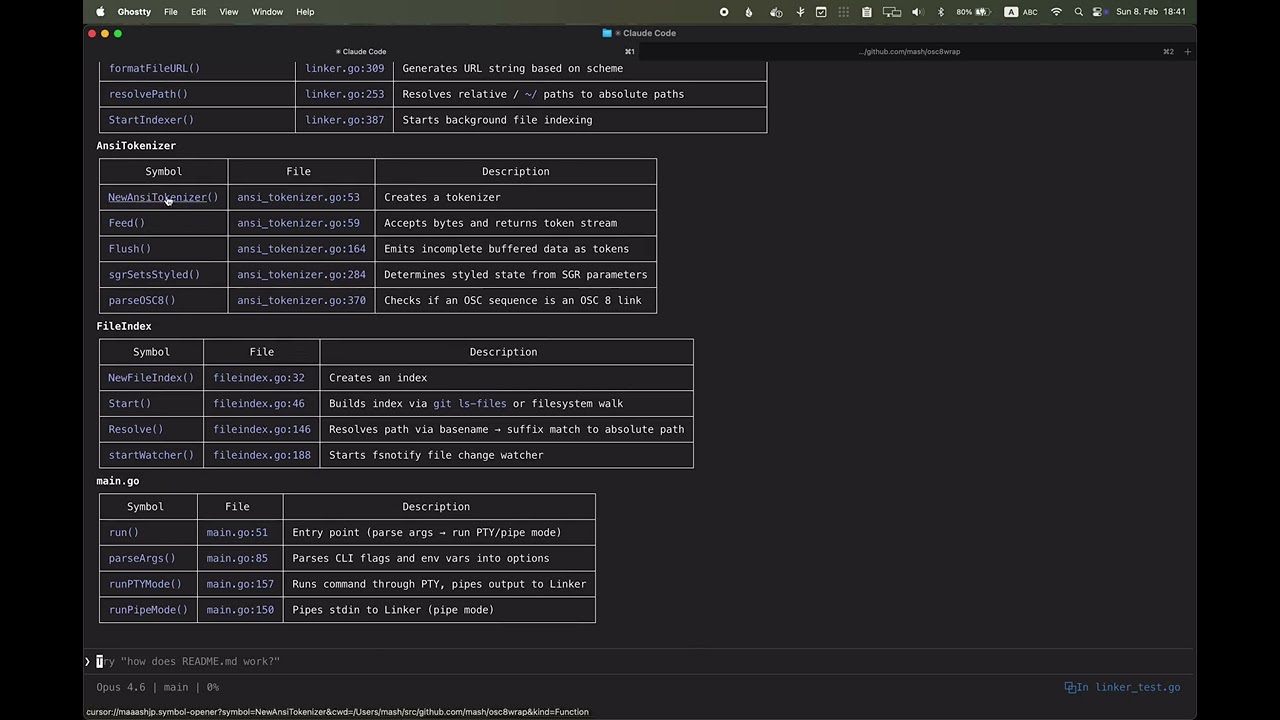
Under an editor scheme (anything but file), osc8wrap detects symbol names in ANSI-styled text (colored, bold, etc.) and links them to the symbol's definition in your editor.
How it works:
- Activates only inside SGR-styled text segments (e.g., colored compiler output, Claude Code, Codex CLI)
- Detects identifiers with 3+ characters (letters, digits, underscores)
- Links to
{scheme}://maaashjp.symbol-opener?symbol=NAME&cwd=CWD - If followed by
(), adds&kind=Functionto the URL
Requirements:
- Install the symbol-opener VS Code/Cursor extension
- The extension uses LSP to resolve symbol definitions
Example:
# Symbol linking works with Claude Code output (which uses colored text)
$ osc8wrap --scheme=cursor claude "what does NewLinker do?"
# "NewLinker" in Claude's response becomes a clickable link to the definition

# Plain text without ANSI styling is NOT processed for symbols
$ echo "NewLinker" | osc8wrap --scheme=cursor
# "NewLinker" is NOT linked (no SGR styling)
Disable with --no-symbol-links.
osc8wrap sessionsLists every Claude Code session on this machine, one record per line: the ones running under osc8wrap right now, and the ones that have finished. Live sessions come first and finished ones after, each group newest first, with the sessions waiting on you at the very top.
The live half comes from osc8wrap's own registry, joined with the metadata Claude publishes in ~/.claude/sessions/ (or $CLAUDE_CONFIG_DIR/sessions if that variable is set): the session's name, whether it is busy or waiting, and what it is waiting for. The finished half comes from Claude's transcripts under ~/.claude/projects/ (likewise $CLAUDE_CONFIG_DIR), read a few dozen lines at a time — the session UUID, the directory it started in, the git branch it was on, and its first prompt. A session that is both — running now, and already holding a transcript — appears once.
There is no picker. sessions writes records and nothing else; the interactive part belongs to fzf and a shell function. The two subcommands below act on the id fzf hands back:
osc8wrap open <id>— jumps to the session's window if it is still running, resumes it withclaude --resumeif it has finished.osc8wrap preview <id>— renders one session for fzf's preview pane.
# osc8wrap: pick a Claude Code session -- running now or long finished -- and open it
ocs() {
  local line id
  line=$(fzf </dev/null \
    --query "$*" --disabled --delimiter=$'\t' --with-nth=1 --highlight-line --no-hscroll \
    --prompt 'fulltext> ' \
    --preview 'osc8wrap preview {2} {q}' \
    --preview-window 'right,60%,wrap,<100(down,60%,wrap)' \
    --bind 'ctrl-/:toggle-preview' \
    --bind 'start,change:reload:osc8wrap sessions {q}') || return
  [ -n "$line" ] || return
  id=${line#*$'\t'}; id=${id%%$'\t'*}   # display=1, id=2, cwd=3
  osc8wrap open "$id"
}
--disabled turns fzf's own filtering off and hands every keystroke to sessions, so what you type matches against the conversations rather than against the display column. Letting fzf filter as well would be wrong, not merely redundant: the query ANDs its terms across the whole conversation, while the excerpt in the display column shows only the neighbourhood of the first one — so fzf would hide rows that matched. The rows arrive in sessions order, newest first, and stay in it.
An empty query is not a special case: {q} is empty until the first keystroke, and sessions with no query lists everything. The bind is therefore the whole story — no fallback command, nothing to silence. ocs with no arguments lists everything; ocs migration opens straight into a search for it.
--format takes a preset or a Go text/template.
| Preset | Output |
|---|---|
fzf (default) |
Three tab-separated fields: a human display column, the id, the cwd. |
json |
An indented JSON array ([] when there is nothing to list). |
The display column of the fzf preset is TAG date repo[/worktree] (branch) summary (waiting for) » match, the last part only under a query. The excerpt goes inside field 1 rather than into a fourth field, so the field numbering stays put and fzf keeps searching it with --with-nth=1. Field 2 being the id and field 3 the cwd is a contract shared with the author's sibling tool ccsearch: one rc-function shape drives both.
Template fields:
| Field | Meaning |
|---|---|
.ID |
The token open and preview accept: the Claude session UUID, or the decimal wrapper pid for a live session that has no UUID yet. |
.Cwd |
The directory the session started in — the only one claude --resume works from. |
.Tag |
WAIT, BUSY, IDLE, LIVE or done. A word, not a glyph, so it can be typed as a filter. |
.Live |
Boolean: an osc8wrap wrapper is still hosting this session. |
.Status |
Claude's own status for a live session (waiting, busy, idle), empty otherwise. |
.WaitingFor |
What a waiting session is waiting for. |
.Repo |
Basename of the repository root. |
.Worktree |
Basename of the linked worktree, empty in a main checkout. |
.Branch |
Branch name, or a short SHA on a detached HEAD. |
.Root |
Absolute repository root. |
.Prompt |
The session's first real user prompt. Empty is normal. |
.Summary |
.Prompt, else .Name, else .Command — osc8wrap wraps non-Claude commands too, and they must not render a blank column. |
.Name |
Claude's own label for a live session. |
.Date |
2006-01-02 15:04, from Claude's updatedAt when live and the transcript mtime otherwise. |
.PID |
Decimal wrapper pid, empty for a finished session. |
.Command |
The wrapped argv of a live session. |
.Match |
Where in the conversation a filtered row hit: an excerpt around the first hit. Empty when nothing was searched for, and when the row matched on its location rather than on anything said. |
Every field is a string or a boolean, and every one is sanitized: no template can fail on a nil, and no prompt containing a tab, a newline or an escape sequence can forge a column. A custom template supplies its own record terminator:
osc8wrap sessions --format '{{.Tag}} {{.Branch}} {{.Summary}}{{"\n"}}'
osc8wrap sessions --format json | jq -r '.[] | select(.tag == "WAIT") | .cwd'
A --format that does not resolve — an unknown preset, a template that does not parse — fails before a single byte reaches stdout. Both --format json and --format=json work.
osc8wrap sessions ratchet migration
osc8wrap sessions 'ratchet migration'
Every argument that is not an option is part of the query: the arguments are joined with spaces and split again on whitespace, so the two lines above are one search either way. No arguments at all — or a query of nothing but whitespace — filters nothing and lists everything, which is what lets a picker bind the query to every keystroke and pass the empty one straight through. A term of your own that starts with - goes after --, which ends the options.
The display column carries the first prompt, which says how a session started. The query searches what was said in it, and where it was said. osc8wrap lists only the sessions matching the query, and a session that hit in its conversation gains a .Match excerpt — the text around the hit — which the fzf preset appends to the display column after a ».
Each term is looked for in two places:
- the conversation: the message text of the user and assistant turns, what you typed and what Claude wrote back. Not tool output, not thinking blocks, not the contents of the files the session read or wrote — those are the bulk of a transcript, and none of them is what you remember a session by.
- the location: the session's cwd, repository root, worktree, branch, and the
repo/worktreebasenames the display column shows.
A term matches when either place holds it; a session is listed when every term matched, wherever each one came from. So osc8wrap sessions osc8wrap ratchet is "the session in the osc8wrap repo where ratchets came up" — the repo name is nowhere in the conversation and the word "ratchet" is nowhere in the path, and neither half of the session answers the query alone. Terms are whitespace-separated and matched case-insensitively as substrings: not a phrase search, and no ordering requirement. A mistyped option before -- is an error rather than a term, so --fromat json cannot come back as a confident empty listing.
The location deliberately stops short of the tag: done, wait, busy and live are not searched. osc8wrap sessions done would otherwise list every finished session on the machine — a filter that hides nothing while looking like it filtered, worse than one you cannot type at all.
A row that matched only on its location carries no .Match, which is the honest answer rather than a gap: the excerpt says where in the conversation the hit was, and for that row there was none.
A live session is filtered like any other, and dropped when nothing about it matches: live rows sort to the top, so keeping them would leave the sessions you filtered out sitting above the ones you wanted. A live session with no UUID yet has no transcript to search, but it does have a cwd, a repository and a branch; it matches on those, and is dropped only when a term needs a conversation it does not have.
osc8wrap preview takes the same query and answers the other half of the question — not which sessions matched, but why this one did. See Previewing a session.
Together they are the whole picker: the rc function above binds the query to every keystroke instead of letting fzf filter anything.
--bind 'start,change:reload:osc8wrap sessions {q}' \The single quotes matter: {q} has to reach fzf unexpanded, and fzf shell-quotes the query as it substitutes it, so a query containing spaces, quotes or $(...) arrives as one argument rather than running. start fills the list before anything is typed, which is also why the rc function feeds fzf from /dev/null — piping a listing in as well would show a stale list until the first reload replaced it.
A full-corpus search per keystroke sounds like the expensive choice and is not. Over 474 sessions and 939 MB of transcripts on the author's machine, warm cache: the plain listing takes 90 ms, a body-only query like sessions prefilter 165 ms, and a two-term mixed query like sessions osc8wrap prefilter 185 ms. The raw line serves as a prefilter, so only the lines that could match are decoded, and the files are searched concurrently.
Searching the location as well makes those queries cheaper, not dearer, because the two halves run in that order: osc8wrap consults the location first, and looks in the transcript only for the terms it did not already satisfy. A session whose every term is answered by its path is never opened at all — sessions nature-server matches 181 rows on their location and reads not one of their bodies, which is why it comes in at 130–160 ms, under the body-only query it replaces. Naming a repository narrows the corpus before the expensive scan instead of after it.
osc8wrap open <id>
osc8wrap open <id> --print
If the session is still running, osc8wrap brings its Ghostty tab or split to the front. If it has finished, osc8wrap runs claude --resume <id> in place — stdio inherited, exit code propagated — from the directory the session started in; resuming from a directory it merely cd'd into later yields "No conversation found". When that directory no longer exists, open refuses and prints the command rather than resuming from the wrong place.
--print writes the resume command and runs nothing:
$ osc8wrap open 13e5c0de-... --print
(cd '/Users/you/src/project' && claude --resume '13e5c0de-...')
Both values are quoted, and a value carrying a control character — macOS lets you create a directory whose name contains an ESC, and Claude records whatever directory it was started in — switches to ANSI-C quoting ($'…') instead. The escape then reaches your shell as text rather than your terminal as a command, at the price of a form bash and zsh understand and POSIX sh does not. open strips the control characters from its own messages for the same reason.
osc8wrap preview <id> [query...]Prints a header naming the session — tag, repo, worktree, branch, date, cwd, id — and then its turns: the first ones for a finished session, because you are identifying it, and the last ones for a live one, because you are checking on it. Trailing words are fzf's {q}, the same query sessions takes. When they match somewhere in the conversation the pane shows that region instead: the turn the query hit, and above it the prompt that led to it, because the hit alone is usually a long answer with your term buried in it and says what was said rather than what was asked. When they do not match — which is every prefix of a query you are still typing — the pane falls back to the usual turns rather than blinking empty. The header is never displaced; it answers a question the query did not replace. What Claude is doing has no line of its own: the tag at the head of the header already says it (WAIT, BUSY, IDLE, LIVE, done), and the listing row you are sitting on says what a waiting session is blocked on.
It reads one transcript, never the whole corpus: fzf respawns it on every keystroke that moves the highlight, and a single invocation costs milliseconds. For a session with no readable transcript it prints the header and a note and still exits 0, so the pane shows what is known rather than an fzf error. Every string taken from a transcript has its control characters stripped, so a turn containing an escape sequence cannot repaint the pane. NO_COLOR suppresses styling.
open on a finished session runs a bare claude, so the resumed session is not registered with osc8wrap: it stays out of the live half of the listing, and you cannot jump to it. If that matters more to you than the extra layer, replace the last line of ocs with this — it reads field 3, the cwd, and wraps the resume itself (add cwd to the local declaration):
  id=${line#*$'\t'}; id=${id%%$'\t'*}
  cwd=${line##*$'\t'}
  case $line in
    done*) (cd "$cwd" && osc8wrap claude --resume "$id") ;;  # finished: re-wrap it
    *)     osc8wrap open "$id" ;;                            # still running: jump to it
  esac
The case is not decoration. The display column starts with the tag, so done* is exactly the finished rows, and only those may be resumed. Resuming a row that is still live starts a second Claude Code on the same session: two processes writing one transcript, two wrappers registered, both publishing the same UUID. The listing then shows that session twice, and osc8wrap open <uuid> finds two records for one id and refuses to open either. The unconditional version of this recipe — resume whatever is under the cursor — corrupts the listing the first time you use it on a live row, which is the common case: live rows sort to the top, where the cursor starts.
The live half only sees sessions started under osc8wrap. Each osc8wrap process records itself in $XDG_STATE_HOME/osc8wrap/sessions/ (~/.local/state/osc8wrap/sessions/ by default) while it runs, and removes the file when it exits; the next listing prunes entries whose process has died. A claude you started without osc8wrap in front of it never shows as live, and osc8wrap has no way to discover it — nothing is scanning your terminals. Wrap the command (osc8wrap claude, or an alias) and it becomes jumpable. The finished half is unaffected: those sessions come from Claude's transcripts and are listed however they were started.
A live session can briefly appear twice. The two halves join on the session UUID, and Claude publishes its UUID a moment after it starts. In that sub-second window the registry entry and the transcript have nothing to join on, so both are listed. The alternative — guessing at the pairing from the directory and the clock — is worse.
Jumping to a session is macOS + Ghostty only. Ghostty exposes no URL scheme, no AppleScript dictionary and no CLI for focusing a surface, so osc8wrap drives macOS Accessibility: it tags the target window by setting its title, then walks Ghostty's windows, tabs and splits until the title matches. That takes a fraction of a second and briefly repaints the target window's title, then restores it. Both ends have to be Ghostty: osc8wrap open must itself run in Ghostty (it checks TERM_PROGRAM and the installed app), and the session you pick must have been started in one, since it is the GHOSTTY_SURFACE_ID recorded at that moment that identifies the surface. Elsewhere — Linux, or another terminal on macOS — listing, previewing and resuming still work; only the jump is unavailable, and osc8wrap prints the reason when you pick a live session.
The Accessibility permission belongs to the host terminal, not to osc8wrap. macOS attributes the permission to the application that owns the process tree, so Ghostty — or whichever terminal application you launched osc8wrap from — is what must be enabled under System Settings → Privacy & Security → Accessibility. Granting it to the osc8wrap binary is not a thing macOS offers. Without it the jump fails with an osascript error and nothing moves.
sessions, open and preview are recognized only as the first non-flag argument. To wrap a program that is itself called one of those, put it after -- — which matters most for open, since macOS ships a real open(1):
osc8wrap -- open .            # runs macOS open(1) on the current directory
osc8wrap open 13e5c0de-...    # the subcommand
osc8wrap -- sessions ratchet  # runs a program named "sessions"
osc8wrap sessions ratchet # the subcommandSee OSC 8 adoption in terminal emulators for a list of supported terminals.
MIT