

Reconstruct Arabic sentences to be used in applications that don't support Arabic script.
Works with Python 3.x
Arabic script is very special with two essential features:
- It is written from right to left.
- The characters change shape according to their surrounding characters.
So when you try to print text written in Arabic script in an application – or a library – that doesn’t support Arabic you’re pretty likely to end up with something that looks like this:
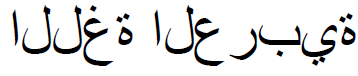
We have two problems here, first, the characters are in the isolated form, which means that every character is rendered regardless of its surroundings, and second is that the text is written from left to right.
To solve the latter issue all we have to do is to use the Unicode bidirectional algorithm, which is implemented purely in Python in python-bidi. If you use it you’ll end up with something that looks like this:
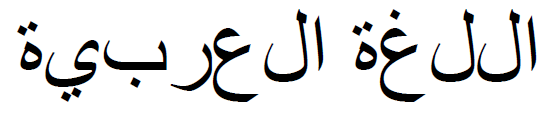
The only issue left to solve is to reshape those characters and replace them with their correct shapes according to their surroundings. Using this library helps with the reshaping so we can get the proper result like this:
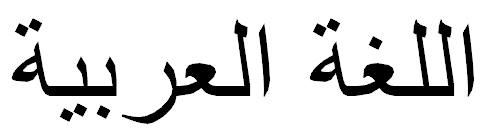
This library predates widespread access to real text shaping engines. Today, HarfBuzz is the standard way to shape Arabic text, and it is available in Python through uharfbuzz, and inside Pillow when it is built with libraqm.
arabic-reshaper works by replacing letters with their
Unicode Presentation Forms
(U+FB50–U+FEFF), which any font-aware renderer can draw as plain characters.
HarfBuzz instead picks glyphs using the font's own OpenType rules, and leaves
your text untouched.
If your rendering pipeline can use a real shaper, prefer it. You will get:
- Correct diacritics: Harakat are positioned by the font (GPOS), instead of being deleted or shifted.
- All the font's ligatures and alternates: Not just the ligatures Unicode
encodes, plus contextual and stylistic features (
calt,salt,ss01, …). - Every Arabic-script language: Letters with no presentation-form codepoints (used in Kurdish, Urdu, Pashto, Sindhi and others) shape correctly, because HarfBuzz doesn't depend on them.
- Text that stays text: Presentation forms break searching, copy-paste, screen readers and Unicode normalization. HarfBuzz only changes glyphs, not the string.
For example, with Pillow you can check PIL.features.check('raqm'). If it
returns True, pass the original text straight to ImageDraw.text(...) and
Pillow will shape it and handle direction for you, with no reshaping or bidi
step needed.
arabic-reshaper is still the right tool when:
- Your renderer only maps characters to glyphs: For example Pillow without libraqm, some plotting, PDF, GUI and game libraries (depending on their version and build), terminals, and embedded displays such as LCDs and thermal printers.
- You need the shaped result as a string: For example to send to a device, file format or API that only accepts text, not glyph IDs.
- You can't install native dependencies: This library is pure Python with no required dependencies.
- Your font only has presentation-form glyphs: Some older or legacy fonts have no OpenType shaping tables, so a shaper has nothing to work with.
In these cases you will usually also need python-bidi to put the reshaped text in visual (right-to-left) order, as shown in the example below.
pip install --upgrade arabic-reshaper
If you're using Anaconda you can use
conda install -c mpcabd arabic-reshaper
import arabic_reshaper

text_to_be_reshaped = 'اللغة العربية رائعة'
reshaped_text = arabic_reshaper.reshape(text_to_be_reshaped)If your Pillow build has libraqm support (PIL.features.check('raqm') returns
True), you don't need this library to draw Arabic text, see
Do you need this library?. Without libraqm, Pillow
draws each character on its own, so you need to reshape the text first.
For this example to work you need to run pip install --upgrade arabic-reshaper python-bidi pillow
import arabic_reshaper

text_to_be_reshaped = 'اللغة العربية رائعة'
reshaped_text = arabic_reshaper.reshape(text_to_be_reshaped)

# At this stage the text is reshaped, all letters are in their correct form
# based on their surroundings, but if you are going to print the text in a
# left-to-right context, which usually happens in libraries/apps that do not
# support Arabic and/or right-to-left text rendering, then you need to use
# get_display from python-bidi.
# Note that this is optional and depends on your usage of the reshaped text.

from bidi.algorithm import get_display
bidi_text = get_display(reshaped_text)

# At this stage the text in bidi_text can be easily rendered in any library
# that doesn't support Arabic and/or right-to-left, so use it as you'd use
# any other string. For example if you're using PIL.ImageDraw.text to draw
# text over an image you'd just use it like this...

from PIL import Image, ImageDraw, ImageFont

# We load Arial since it's a well known font that supports Arabic Unicode
font = ImageFont.truetype('Arial', 40)

image = Image.new('RGBA', (800, 600), (255,255,255,0))
image_draw = ImageDraw.Draw(image)
image_draw.text((10,10), bidi_text, fill=(255,255,255,128), font=font)

# Now the text is rendered properly on the image, you can save it to a file or just call `show` to see it working
image.show()

# For more details on PIL.Image and PIL.ImageDraw check the documentation
# See http://pillow.readthedocs.io/en/5.1.x/reference/ImageDraw.html?#PIL.ImageDraw.PIL.ImageDraw.Draw.textYou can configure the reshaper to your preferences, it has the following settings defined:
language(Default:'Arabic'): Which letter table to use.'Arabic'works with Arabic, Farsi, Urdu, and most other languages that use Arabic script.'Kurdish'uses forms that match Kurdish fonts, and'ArabicV2'is an alternative Arabic table. Any other value falls back to'Arabic'.support_ligatures(Default:True): When this is set toFalse, the reshaper will not replace any ligatures, otherwise it will replace enabled ligatures.delete_harakat(Default:True): When this is set toFalsethe reshaper will not delete the harakat from the text, this will result in them showing up in the reshaped text, you should enable this option if you are going to pass the reshaped text tobidi.algorithm.get_displaybecause it will reverse the text and you'd end up with harakat applied to the next letter instead of the previous letter.delete_tatweel(DefaultFalse): When this is set toTruethe reshaper will delete the Tatweel character (U+0640) from the text before reshaping, this can be useful when you want to support ligatures and don't care about Tatweel getting deleted.shift_harakat_position(DefaultFalse): Whether to shift the Harakat (Tashkeel) one position so they appear correctly when string is reversed, this might solve the problem of Tashkeel in some systems, although forPIL.Imagefor example, this is not needed.support_zwj(DefaultTrue): Whether to support ZWJ (U+200D) or not.use_unshaped_instead_of_isolated(DefaultFalse): Use unshaped form instead of isolated form, useful in some fonts that are missing the isolated form of letters.
Besides the settings above, you can enable/disable supported ligatures. For a full list of supported ligatures and their default status check the file default-config.ini.
There are multiple ways that you can configure the reshaper in, choose the one that suits your deployment:
Instead of directly using arabic_reshaper.reshape function, define an
instance of arabic_reshaper.ArabicReshaper, and pass your config dictionary
to its constructor's configuration parameter like this:
from arabic_reshaper import ArabicReshaper
configuration = {
    'delete_harakat': False,
    'support_ligatures': True,
    'RIAL SIGN': True,  # Replace ر ي ا ل with ﷼
}
reshaper = ArabicReshaper(configuration=configuration)
text_to_be_reshaped = 'سعر المنتج ١٥٠ ر' + 'يال'  # had to split the string for display
reshaped_text = reshaper.reshape(text_to_be_reshaped)You can separte the configuration from your code, by copying the file
default-config.ini and change its settings,
then save it somewhere in your project, and then you can tell the reshaper
to use your new config file, just pass the path to your config file to its
constructor's configuration_file parameter like this:
from arabic_reshaper import ArabicReshaper
reshaper = ArabicReshaper(configuration_file='/path/to/your/config.ini')
text_to_be_reshaped = 'سعر المنتج ١٥٠ ر' + 'يال'  # had to split the string for display
reshaped_text = reshaper.reshape(text_to_be_reshaped)
Where in you config.ini you can have something like this:
[ArabicReshaper]
delete_harakat = no
support_ligatures = yes
RIAL SIGN = yes
Instead of having to rewrite your old code to configure it like above, you can
define an environment variable with the name
PYTHON_ARABIC_RESHAPER_CONFIGURATION_FILE and in its value put the full path
to the configuration file. This way the reshape function will pick it
automatically, and you won't have to change your old code.
If you intend to render the text in a TrueType® font, you can tell the library to generate its configuration by reading the font file to figure out what's supported in the font and what's not.
To use this feature you need to install the library with an extra option (not necessary when you install it with conda):
pip install --upgrade arabic-reshaper[with-fonttools]
Then you can use the reshaper like this:
import arabic_reshaper

reshaper = arabic_reshaper.ArabicReshaper(
    arabic_reshaper.config_for_true_type_font(
        '/path/to/true-type-font.ttf',
        arabic_reshaper.ENABLE_ALL_LIGATURES
    )
)
This will parse the font file, and figure out what ligatures it supports and enable them,
as well as whether it has isolated forms or use_unshaped_instead_of_isolated should be
enabled.
The second parameter to config_for_true_type_font can be one of
ENABLE_NO_LIGATURESENABLE_SENTENCES_LIGATURESENABLE_WORDS_LIGATURESENABLE_LETTERS_LIGATURESENABLE_ALL_LIGATURES(default)
which controls what ligatures to look for, depending on your usage, see default-config.ini to know what ligatures are there.
Harakat or Tashkeel
might not show up properly in their correct place, depending on the application
or the library that is doing the rendering for you, so you might want to enable
the shift_harakat_position option if you face this problem.
This work is licensed under MIT License.
Online Arabic Reshaper: http://pydj.mpcabd.xyz/arabic-reshaper/
https://github.com/mpcabd/python-arabic-reshaper/tarball/master
Kurdish fixes and Python 3.15 support.
- Kurdish (
language: 'Kurdish'):- Added
ڵ(U+06B5, lam with small v), which was left unshaped. See #67, #104. - Added
ڕ(U+0695, reh with small v below), which was left unshaped. See #106. ه(heh) now uses the right glyph in each position. Before, every form used the medial glyph, so word-initial and final heh had a stray connecting stroke. See #106.- Standalone
ح(hah) no longer maps to U+FEA1, which Kurdish fonts don't have, so it is drawn again. See #106. - Standalone
ێno longer uses the final-form glyph. See #106. - The Kurdish forms are checked against the Sarchia and Unikurd Web fonts.
Output changes for text with
ه,ح,ێ,ڵorڕ.
- Added
- Supports and tests on Python 3.15.
arabic_reshaper.__version__reports the right version again (it said 3.0.0).
- Modernised packaging: migrated from
setuptoolstohatchlingviapyproject.toml - Dropped support for Python < 3.10
- Switched CI from Travis CI to GitHub Actions
- Added type hints and improved test coverage for font configuration
- Removed obsolete Anaconda publishing scripts
- Stop supporting Python 2.7
- Remove dependency on
future. See #88.
- Fix unparseable version bound for
fonttoolsunder Python 2
- Remove dependency on
__version__.pyanddefault-config.inifiles, as they were causing problems for people who package their apps using pyinstaller or buildozer.
- Fix a warning. See #57. Thanks @fbernhart
- Added support for settings based on a TrueType® font
- New option
use_unshaped_instead_of_isolatedto get around some fonts missing the isolated form for letters.
BROKEN please make sure not to use this version.
- Updated letters and ligatures
- New option
shift_harakat_positionto try to get around the Tashkeel problem
- Proper support for ZWJ
- Fix Shadda ligatures
- Added support for ZWJ (Zero-width Joiner) (U+200D)
- Added
delete_tatweel - Added more test cases
- Fix tests for Python 2.7
- Fixed a bug with Harakat breaking the reshaping
- Wrote two small unit tests, more to come
- Moved letters and ligatures to separate files for readability/maintainability
- Moved package to its own folder for readability/maintainability
Fix error message formatting
Fix error message formatting
Use Exception instead of Error.
Use pkg_resources.resource_filename instead of depending on __file__ to access default-config.ini.
Include default-config.ini in setup.py
- Totally rewrote the code;
- Faster and better performance;
- Added the ability to configure and customise the reshaper.
- New glyphs for Farsi;
- Added setup.py;
- Bugfixes.
- Ported Better Arabic Reshaper to Python.
Abdullah Diab (mpcabd) Email: mpcabd@gmail.com Blog: http://mpcabd.xyz
For more info visit my blog post here