Nextcloud dialog helpers
npm i -S @nextcloud/dialogs
@nextcloud/dialogs |
maintained | Nextcloud server version |
|---|---|---|
| 8.x | ✅ | Nextcloud 35 and newer |
| 7.x | ✅ | Nextcloud 31, 32, 33, 34 |
| 6.x | ❌ | Nextcloud 29, 30, 31, 32 |
| 5.x | ❌ | Nextcloud 28, 29, 30 |
| 4.2+ | ❌ | Nextcloud 25, 26, 27, 27.1 |
| 4.1 | ❌ | any up to Nextcloud 30 |
Versions v4.2 to including the v6 series included a peer dependency on @nextcloud/vue and thus needed a specific version of this dependency.
Starting with the v7 series this peer dependency has become a regular dependency so that this library can be used with or without any specific dependency of the host application to @nextcloud/vue.
Important
The styles for the components (Toasts and FilePicker) are imported automatically by the package entry points.
Your bundler has to support importing CSS files from JavaScript (e.g. Vite, or Webpack with css-loader).
import { showMessage, showInfo, showSuccess, showWarning, showError } from '@nextcloud/dialogs'If your app only needs toasts, you can import them from the @nextcloud/dialogs/toast entry point instead.
(Note: Webpack issue - bundler might include other components source, e.g. the FilePicker, in the app):
import { showError } from '@nextcloud/dialogs/toast'There are different toast styles available, that are exposed in separate functions:
showMessage('Message without a specific styling')
showInfo('Information')
showSuccess('Success')
showWarning('Warning')
showError('Error')
There are several options that can be passed in as a second parameter, like the timeout of a toast:
showError('This is an error shown without a timeout', { timeout: -1 })
Ordinary toasts (success, error, warning, info, and bare messages) use the user-configured toast timeout
from the theming capabilities (theming.toastTimeout) when available, and fall back to
TOAST_DEFAULT_TIMEOUT (7 seconds) otherwise.
Loading toasts stay permanent until hidden manually, and undo toasts keep their fixed undo duration.
A full list of available options can be found in the documentation.
Toasts are displayed in the bottom start corner of the page and are shifted by the width of the app navigation when it is open.
Apps can adjust the toasts position with a CSS variable, the value is added to the default distance to the bottom (default: 0px):
:root {
	--toast-offset-block-end: 80px;
}To spawn the FilePicker provided by the library you have to use the FilePickerBuilder. The FilePickerBuilder is included in the main entry point of this library, so you can use it like this:
import { getFilePickerBuilder } from '@nextcloud/dialogs'
const filepicker = getFilePickerBuilder('Pick plain text files')
    .addMimeTypeFilter('text/plain')
    .addButton({
        label: 'Pick',
        callback: (nodes) => console.log('Picked', nodes),
    })
    .build()

// You get the file nodes by the button callback, but also the pick yields the paths of the picked files
const paths = await filepicker.pick()For testing all components provide data-testid attributes as selectors, so the tests are independent from code or styling changes.
data-testid |
Intended purpose |
|---|---|
select-all-checkbox |
The select all checkbox of the file list |
file-list-row |
A row in the file list (tr), can be identified by data-filename |
row-checkbox |
Checkbox for selecting a row |
row-name |
Name of the row / file |
- Pull the latest changes from
mainorstableX - Checkout a new branch with the tag name (e.g
v4.0.1):git checkout -b v<version> - Run
npm version patch --no-git-tag-version(npm version minor --no-git-tag-versionif minor). This will return a new version name, make sure it matches what you expect - Generate the changelog content from the release page.
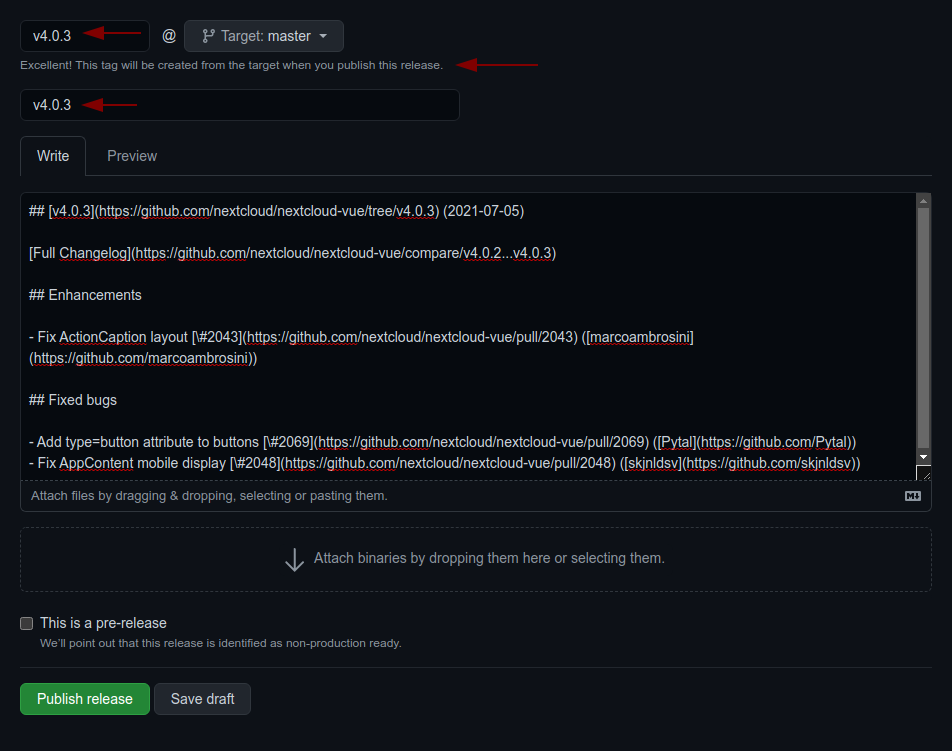
Create a draft release, select the previous tag, click
generatethen paste the content to theCHANGELOG.mdfile- adjust the links to the merged pull requests and authors so that the changelog also works outside of GitHub
by running
npm run prerelease:format-changelog. This will apply this regex:by @([^ ]+) in ((https://github.com/)nextcloud-libraries/nextcloud-dialogs/pull/(\d+))Which this as the replacement:[\#$4]($2) \([$1]($3$1)\) - use the the version as tag AND title (e.g
v4.0.1) - add the changelog content as description
- adjust the links to the merged pull requests and authors so that the changelog also works outside of GitHub
by running
- Commit, push and create PR
- Get your PR reviewed and merged
- Create a milestone with the follow-up version at https://github.com/nextcloud-libraries/nextcloud-dialogs/milestones
- Move all open tickets and PRs to the follow-up
- Close the milestone of the version you release
- Publish the previously drafted release on GitHub