Repository navigation
Tablet enhancement #6769

Description

@jancborchardt, @stefan-niedermann and me did a comparison how other do tablets and we came to the conclusion that we are pretty close.
Missing on tablet:
- re-add values-land to detect tablet mode -> detect tablet mode again #6924
- remove dual pane entirely, as all willl open in full screen/ same fragment
- open PreviewTextFragment within left fragment Open PreviewTextFragment within left fragment #6926
- span list/grid view across whole area. In List view show two columns
Later:
- think about which fragments can be dialogs, e.g share file detail share fragment
Activity
axellebot commentedon Nov 24, 2020
What about using flexbox-layout for tablette for grid view ?
AndyScherzinger commentedon Nov 24, 2020
I wouldn't limit a flexbox discussion to tablets, since for a panorama images this would also make sense on mobile phones, no?
axellebot commentedon Nov 24, 2020
To be honest I was thinking about using the flexbox lib to integrate a look-alike staggered view for the 3rd zoom-in scaled grid view 😅
AndyScherzinger commentedon Nov 24, 2020
Well having a staggered view has been requested (don't know the issue number) for respecting pano(rama) images (as in very wide images) quite a while ago but nobody found the time or had the priority/motivation to implement this, so this would be quite nice I think. But we should also get some feedback from the @nextcloud/designers here :)
axellebot commentedon Nov 24, 2020
What about talking about implementing the flexbox-layout to improve screen capability in the first place and keep staggered view on the correct issue for later ?
AndyScherzinger commentedon Nov 24, 2020
@axellebot what would be the benefit of using flexbox from your point of view or to rephrase the question which issues would you be able to solve layout-wise?
axellebot commentedon Nov 24, 2020
Ho sorry I misunderstood something here. On my side I experienced an issue with grid view items from the same row that stretched on Y-Axis (only background layout) .
Right now 2 type of
LayoutManagerare used,LinearLayoutManagerandGridLayoutManager. TheFlexboxLayoutManagerseems to be capable of handling both configuration and more with granularity configuration about list and item behaviors side (for future purpose) and less heterogeneityLayoutManagercode.axellebot commentedon Nov 26, 2020
May I create a PR to remove the dual panel and span list/grid view (with multiple list column for large screen) ?
AndyScherzinger commentedon Nov 26, 2020
@axellebot best to talk to @tobiasKaminsky, see #7371 since he already started to work on the tablet layout/behavior so you might be able to help him out while all the things he is changes have already been discussed and agreed on with the design team :)
AndyScherzinger commentedon Nov 26, 2020
other than that it would be awesome if you can collaborate on this matter @axellebot ❤️
tobiasKaminsky commentedon Nov 27, 2020
That is unfortunately a real heavy and cluttered task.
As you can see with #7371 I do this step by step.
If you want to help, I think a nice and somehow isolated task would be to have two columns in tablet mode (for list view):
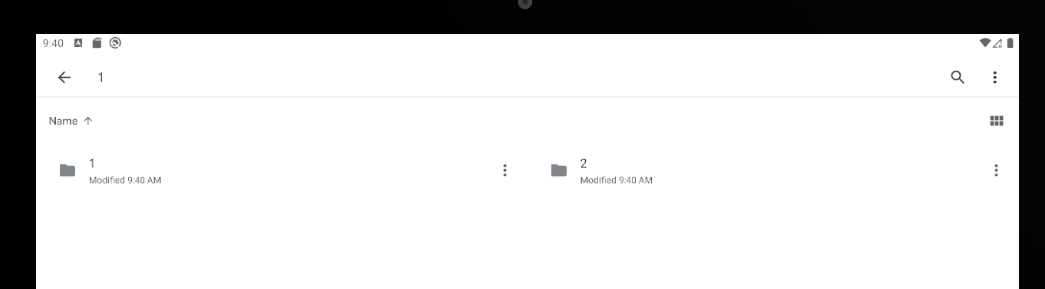
(this is a screenshot from Google Drive)
AndyScherzinger commentedon Nov 27, 2020
@axellebot see also #6769 for further input
axellebot commentedon Nov 28, 2020
During implementation I found that there is a boolean that manage the dual panel.
What about a fast PR to just disable the dual panel for production purpose in first place ?
tobiasKaminsky commentedon Nov 30, 2020
We could, but then for each and every testing we would have to enable boolean again.
Additionally no tablet user who is using dev version can test it.
I would rather keep it enabled and get more feedback from users.
blitzdesigner commentedon Jan 10, 2021
So my feedback as a user is, that this is absolutely annoying and frustrating. So much, that I quit using the nextcloud app entirely on the tablet and using the browser. Also, since when can one not swipe through pictures and videos at the same time? this worked before, now a video only opens on the right pane of the screen and not directly in full screen.
Interestingly, a few weeks ago, the tablet used the full screen! and than, out of nowhere, back to unusable display of file names.
Please guys, this is really urgend!
nando-n commentedon Feb 4, 2021
I totally agree with blitzdesigner. It's impossible to read file names on the tablet. Neither in portrait nor landscape mode. The section for the file list on the right side is super small (~30% of the screen width) and file name that are 40+ characters are impossible to read.
Please remove the huge empty block on the right side or add some button to minimize/close it and show the list/grid of files over the full screen.
I am using the current version 3.15.0 on a Samsung Galaxy Tab Active Pro SM-T540
Derive grid column count from the width the list is given
sandbranch commentedon Aug 31, 2026
The grid half of this is addressed in #17542: the column count now follows the width the list is actually given, instead of coming from the stored zoom preference regardless of screen size.
The default target cell width was picked so that a phone in portrait stays at three columns, so existing phone users see no change; only wider windows gain columns. Pinch to zoom still works and is still remembered.
The list view half of the item ("In List view show two columns") is not covered by that PR.