
Use phones as gamepads for browser games. The game shows a QR code, each player scans it, and their phone becomes a controller. No accounts, no app install: one small self-hosted Node server and a few lines in your game. Made for local multiplayer and party games on a laptop or TV.


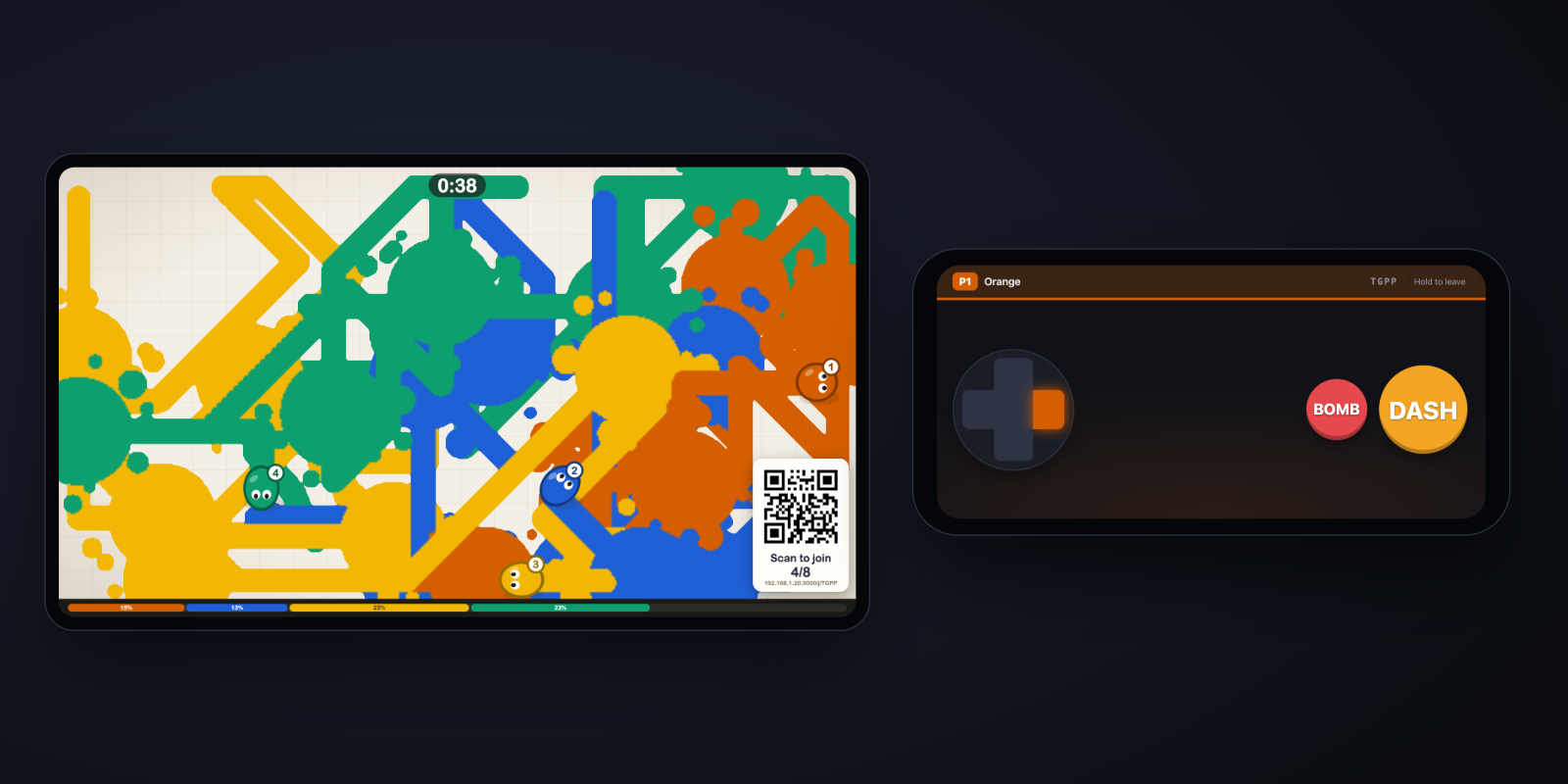
Live demo: Paint Party. Open it on a big screen and scan the QR
with phones: one QR for everyone, drop in or out anytime, 1-8 players, haptics
on Android. Its source is a single file in
examples/paint-party that uses only the public SDK.
Save this as my-game/index.html:
<!doctype html>
<meta charset="utf-8">
<img id="qr" width="240">
<script type="module">
  import { host } from '/joinstick/host.js';
  const room = await host({ slots: 2 });          // default pad: d-pad + A, B
  document.getElementById('qr').src = room.qr();  // every player scans this
  (function frame() {
    const p1 = room.input(1);                     // { x, y, buttons, pressed }, never undefined
    if (p1.pressed.a) console.log('jump!');       // x, y in [-1, 1]; pressed = went down since last read
    requestAnimationFrame(frame);
  })();
</script>
Then run (Node 22 or newer):
npx joinstick --static ./my-gameOpen http://localhost:3000 on the computer, scan the QR with a phone on the
same Wi-Fi, and press A. Embedding in your own Node server or using
TypeScript: npm i joinstick. A complete example game is in
examples/basic.
examples/paint-party is a party game for 1-8 phones
that join and leave at any time through one QR code
(play it live: open it on a big
screen, then scan the QR with phones).
Run Joinstick on its own port next to your dev server (Vite, webpack...) and tell the SDK where it is:
npm i joinstick
npx joinstick                 # Joinstick alone on :3000
import { host } from 'joinstick/host'; // typed
const room = await host({ slots: 2, server: `http://${location.hostname}:3000` });QR codes then point at that server. If your dev server uses HTTPS, Joinstick needs HTTPS too (see Self-hosting).
  laptop / TV                     Joinstick server                 phones
 ┌─────────────┐   WebSocket    ┌──────────────────┐  WebSocket   ┌──────────┐
 │ your game   │ ◄────────────► │ rooms, relay,    │ ◄──────────► │ pad page │
 │ + host.js   │  input, joins  │ QR codes, pad    │  pad state   │ /j/KQZX/1│
 └─────────────┘                │ page, SDKs       │              └──────────┘
                                └──────────────────┘
The game creates a room (KQZX) with up to 8 player slots. One QR code opens
/j/KQZX on any phone, which takes the first free slot (/j/KQZX/<slot> asks
for a specific one). The phone sends its controller
state on every change; your game reads room.input(n) once per frame. All
traffic goes through your server; nothing leaves your network unless you put
it on the internet.
- Zero install for players: a QR code (or
http://<laptop-ip>:3000/jand a 4-letter code) opens the controller in the phone's browser. - Small and self-hosted: one Node process, two runtime dependencies
(
ws,uqr), plain ES modules in the browser, no build step. - Reconnects automatically: phones that lock or drop Wi-Fi leave and rejoin
their own slot; game page reloads and server restarts keep the room code.
Your game gets
join/leaveevents to pause and resume. - Configurable pad: d-pad plus up to 8 buttons with labels, colors and sizes; the game can retitle, recolor, highlight or disable buttons live.
- Landscape by default: held upright, the pad shows rotated, so it works with the phone's rotation lock on (on Android Chrome the first tap also tries fullscreen and an orientation lock).
- Haptics: a short tick on every press (Android; best effort on iOS 18+, see the FAQ), plus game-driven vibration on Android.
- Bring your own controller: the pad is just one client of a documented
JSON/WebSocket protocol;
client.jslets you build your own or drive pads from tests.
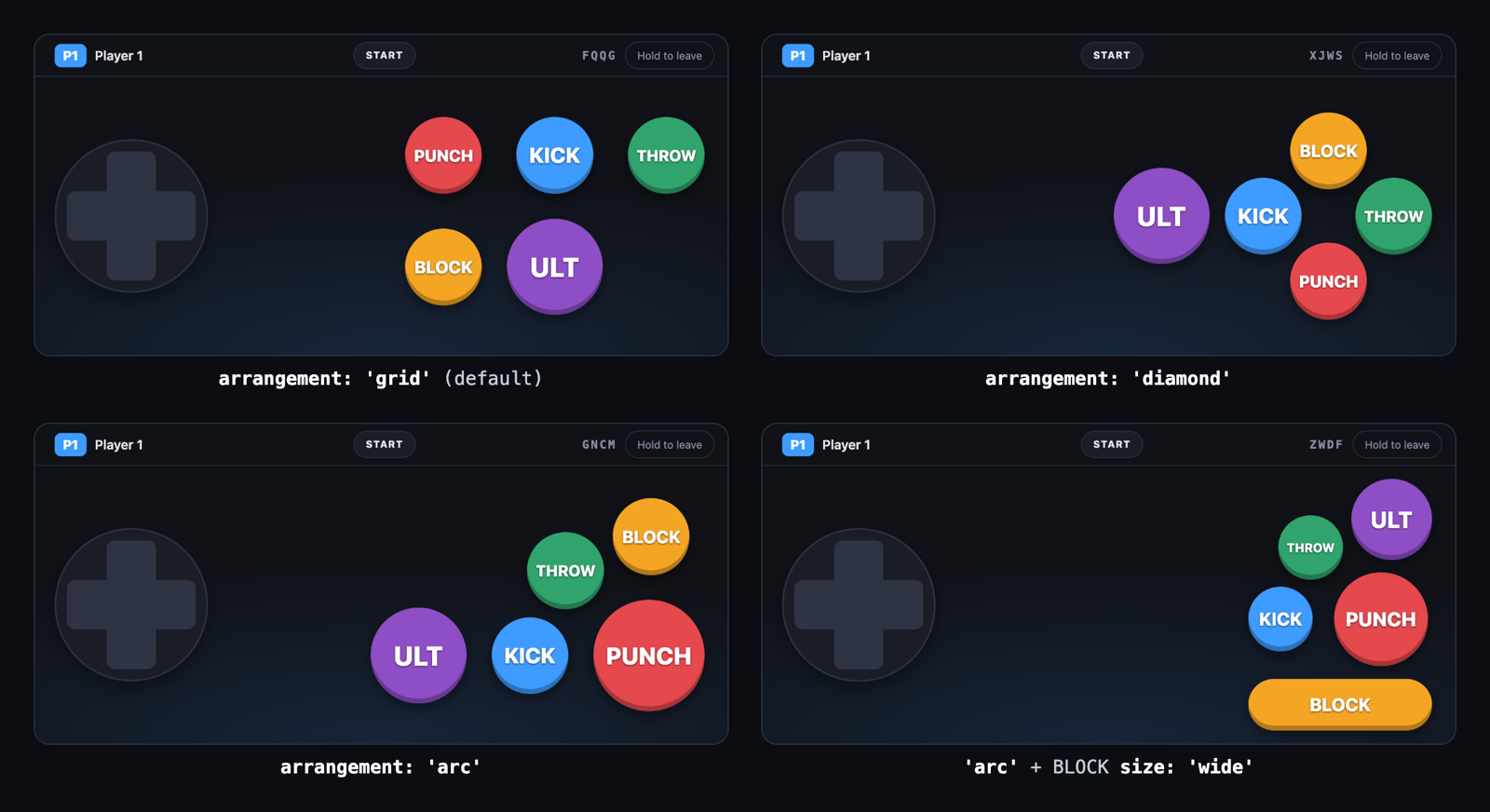
await host({
  slots: 2,
  layout: {
    arrangement: 'arc',               // 'grid' (default) | 'diamond' | 'arc'
    buttons: [
      { id: 'punch', label: 'PUNCH' }, // in 'arc' the first button is the big one
      { id: 'kick', label: 'KICK' },
      { id: 'ult', label: 'ULT', size: 'large' },
      { id: 'block', label: 'BLOCK', size: 'wide' },   // a bar to rest a thumb on
      { id: 'start', label: 'START', system: true },   // a pill in the top bar
    ],
  },
});
Also: stick: 'none' (buttons only), orientation: 'landscape' | 'portrait' | 'any', haptics: false, per-button color and haptic (ms). Taps between
buttons go to the nearest one, and several fingers work at once (move, hold
a button, tap another). Full schema in AGENTS.md.
Game side (/joinstick/host.js) |
|
|---|---|
host({ slots, layout, server }) |
Create (or after a reload, resume) a room. server is the Joinstick URL when the game is served elsewhere. |
room.input(n) |
{ x, y, buttons, pressed } for player n. Read it every frame. |
room.qr(n?), room.joinUrl(n?) |
QR image URL and plain join link for player n. Without n: one link for everyone, each phone gets the first free slot. |
room.connected(n), room.on('join' | 'leave', fn) |
Who is here; pause when someone drops. |
room.pad(n, { title, color, highlight, disabled, vibrate }) |
Change what a phone shows. |
room.send(n, data), room.broadcast(data), room.on('message', fn) |
Custom messages both ways. |
room.kick(n), room.close() |
Remove a player; end the room. |
room.on('status' | 'error', fn) |
Connection to the server (connected, reconnecting...) and fatal errors. |
Server side (import { attach } from 'joinstick') |
|
|---|---|
attach(httpServer, { static, publicUrl }) |
Add Joinstick to your own Node HTTP server. |
Types: host.d.ts, client.d.ts,
server.d.ts. Wire protocol: PROTOCOL.md.
Everything else (input contract, pausing, error codes, testing without
phones): AGENTS.md.
joinstick [--port 3000] [--static ./dir] [--public-url URL] [--client-ip-header NAME] [--version]
| Flag | Env | |
|---|---|---|
--port |
PORT |
Port to listen on. Default 3000. |
--static <dir> |
Also serve your game from this directory. | |
--public-url <url> |
PUBLIC_URL |
Origin that QR codes and join links use (no path). Default: the host the game page connected with, unless it is localhost/loopback; then the detected LAN address. |
--client-ip-header <name> |
CLIENT_IP_HEADER |
Header a reverse proxy sets to the visitor's address (fly-client-ip, x-real-ip). The per-address limits use it instead of the proxy's address. Only set it behind a proxy that overwrites the header. |
-v, --version |
Print the version. |
-
LAN (the usual case): run it on the laptop that shows the game. Phones on the same Wi-Fi open the printed "Phones join at" URL. Plain HTTP is fine.
-
Behind a reverse proxy with TLS: proxy everything (or at least
/j,/joinstick/) to Joinstick, let the proxy pass WebSocket upgrades on/joinstick/ws, and start Joinstick with--public-url https://your.domainso QR codes point at the public address. Behind a proxy every game shares the proxy's IP address, so the 20-rooms-per-IP cap applies to all of them together unless you pass--client-ip-headerwith a header your proxy overwrites with the visitor's address (Fly.io:fly-client-ip). With Caddy (which passes WebSockets through by default):your.domain { reverse_proxy localhost:3000 } -
Docker: the repo has a small Dockerfile (non-root, Node 22 Alpine; it is not in the npm package). Inside a container the LAN address cannot be detected, so pass
--public-url. From a clone of the repo:docker build -t joinstick . docker run --rm -p 3000:3000 -v "$PWD/my-game:/site:ro" joinstick \ --static /site --public-url http://<your-lan-ip>:3000
What works today: put the server on a public URL (a tunnel such as
cloudflared tunnel --url http://localhost:3000, or a reverse proxy) and pass
that URL as --public-url. Remote phones then join like local ones.
What it does not do: Joinstick only carries controller input. Remote players still need to see the game (screen sharing, a video call). Input is relayed through your server, not peer to peer, so each remote player adds their network delay to the server.
Security on a public URL, plainly:
- The room code is the only credential. Codes are 4 letters from 20 consonants, so 160,000 possible codes. Anyone who guesses a live code can take a free slot (a taken slot also needs that phone's secret token).
- Guessing is slowed down: after 20 failed joins in a minute, an address is refused for the rest of that minute (not counted in the first minute after the server starts, while phones rejoin). Behind a tunnel or proxy every phone shares the proxy's address, so a guesser also delays real players by up to a minute.
- The server does not check the
Originheader: any web page that knows the server's address can open a connection to it, like any other client.
Fine for playing with friends; not for anything secret.
Point your agent at AGENTS.md: integration checklist, full API,
input contract, pitfalls, and how to test with scripted pads instead of
phones. A running server also serves a condensed version at /llms.txt.
The phone can't connect. It must reach the laptop: same Wi-Fi, and allow Node through the firewall prompt on first run (macOS/Windows). Guest, hotel and office networks often isolate devices; use a phone hotspot or a tunnel. If the printed "Phones join at" URL doesn't open on the phone, nothing else will.
Do players need the same Wi-Fi? For local play, yes (or any network where the phone can reach the server). For remote play, see above.
Does vibration work on iPhone? Partly. Android gets tap feedback and game-driven vibration. iOS Safari has no vibration API; on iOS 18+ the pad plays the system's single haptic tick on presses as a best effort (length is ignored, game-driven vibration does nothing). Older iOS and desktops: none.
How much latency? Input is sent the moment it changes, with no polling or batching. On a LAN the delay is about one Wi-Fi hop from the phone to the laptop. The server's own relay is small: measured on loopback (pad socket to server to game socket, same machine, 500 inputs) the median was 0.06 ms. We have not published phone-to-screen numbers.
Which browsers?
| Chrome / Android | Safari / iOS | Firefox | Samsung Internet | |
|---|---|---|---|---|
| Phone pad | 87 | 14.5 | 79 | 14 |
Game page (host.js) |
93 | 15.4 | 92 | 17 |
Derived, not tested on each version: these are the first versions that
support the newest feature each side needs, looked up in MDN's
browser-compat-data 8.1.4. Pad:
CSS inset (Chrome 87, iOS 14.5), ??= (Firefox 79), plus Pointer Events,
ES modules and WebSocket. Game page: Object.hasOwn in host.js; the
Quick start snippet also uses top-level await (Chrome 89, Safari 15,
Firefox 89). Newer browsers additionally get color-mix() colors (Chrome 111,
Safari 16.2, Firefox 113); older ones show plainer colors. The iOS haptic tick
needs iOS 18.
Limits? 8 players per room, 8 buttons per pad, 1000 rooms per server (20 per IP address), 8 KB per message. A room closes 60 s after the game page goes away.
HTTPS game page? A page served over HTTPS cannot open a plain ws://
connection. Serve the game with --static, or put both behind HTTPS.
MIT © 2026 Rafa Prats. Third-party notices: THIRD_PARTY_NOTICES.md. QR Code is a registered trademark of DENSO WAVE INCORPORATED.